
Mountain trails, field camps, boat fleets and remote forest patrol points have no cellular signal, and large events can saturate the public network. What these sites usually need is not bandwidth but team members who can exchange text, see each other's positions, and send out a position when something goes wrong.
LoRa Mesh (this guide uses the open-source Meshtastic firmware as the example) carries this kind of low-bandwidth data over low-power LoRa radio. Nodes forward traffic hop by hop, with no base station, gateway or internet. Selection needs four questions settled together: what data to send, where nodes go, what terminals people carry, and how devices are powered and set to a band.
This guide works through those four steps with decision rules and comparison tables. Distance and battery-life figures are rated values from the official wiki and datasheets, not results measured for this guide — the measurement basis is at the end.
Quick answer
| Requirement | Model | Role in the network | Basis (rated) | Reference price | |
|---|---|---|---|---|---|
 | Fixed relay at an off-grid site; node needs its own battery and positioning | SenseCAP Solar Node P1-Pro | Fixed relay node | 5W solar panel + 4 × 18650 batteries; 8–9 km in open terrain; IPX6 | Approx. $90–105 |
 | Fixed relay, no node position needed, budget-constrained | SenseCAP Solar Node P1 | Fixed relay node | Solar node like P1-Pro; no GPS, no batteries included (supply your own 18650) | Approx. $70–85 (no batteries) |
 | Carried by people to exchange text and share position | SenseCAP T1000-E for Meshtastic | Personnel terminal | Card size, 32 g; GNSS positioning; 2–8 km (depending on antenna, installation and environment); IP65 | Approx. $38–46 |
 | Proof of concept before a project, bench testing | XIAO nRF52840 & Wio-SX1262 Kit for Meshtastic | Prototype node | No enclosure; add battery and antenna as needed | Approx. $13–20 |
Reference prices are unit prices at the time of lookup, for judging order of magnitude only; they vary with configuration, volume and time, and the product page is authoritative when ordering.
Three conditions change the table above:
- Video, voice, images or large files must be carried — LoRa Mesh does not fit; use another link. This design carries only text messages, positions and small telemetry
- Data must reach a cloud platform or customer system — the mesh itself needs no gateway; to reach a cloud platform, add a LoRaWAN gateway or connect through Meshtastic MQTT
- The project is deployed in mainland China — the rated hardware frequency range of these devices is 862/863–930 MHz, which does not cover Meshtastic's CN region band (470–510 MHz). Confirm the usable band for the target country before ordering
If the requirement is already clear, select directly from the table. For the reasoning, read the four steps below.
Why LoRa Mesh for off-grid communication
The four steps below assume nodes form the network directly, with no infrastructure. Compared with designs that rely on cellular coverage or fixed gateways, the difference shows in three places.
No base station or gateway. Every node sends and receives its own data and also forwards data for other nodes. A network of personnel terminals and fixed nodes works on its own; phones connect to terminals over Bluetooth to read messages and positions.
Coverage grows by adding nodes. Single-hop distance depends on terrain, mounting height and antenna. When two terminals are beyond one hop, intermediate nodes forward the traffic. Meshtastic forwards up to 3 hops by default, configurable up to 7.
Data is encrypted within the network. Meshtastic encrypts message content per channel, and direct messages additionally use public-key encryption, so devices outside the channel cannot read the content.
The limitation is equally clear: LoRa is a low-rate link, suited only to text, position and small sensor data.
System anatomy and three device types
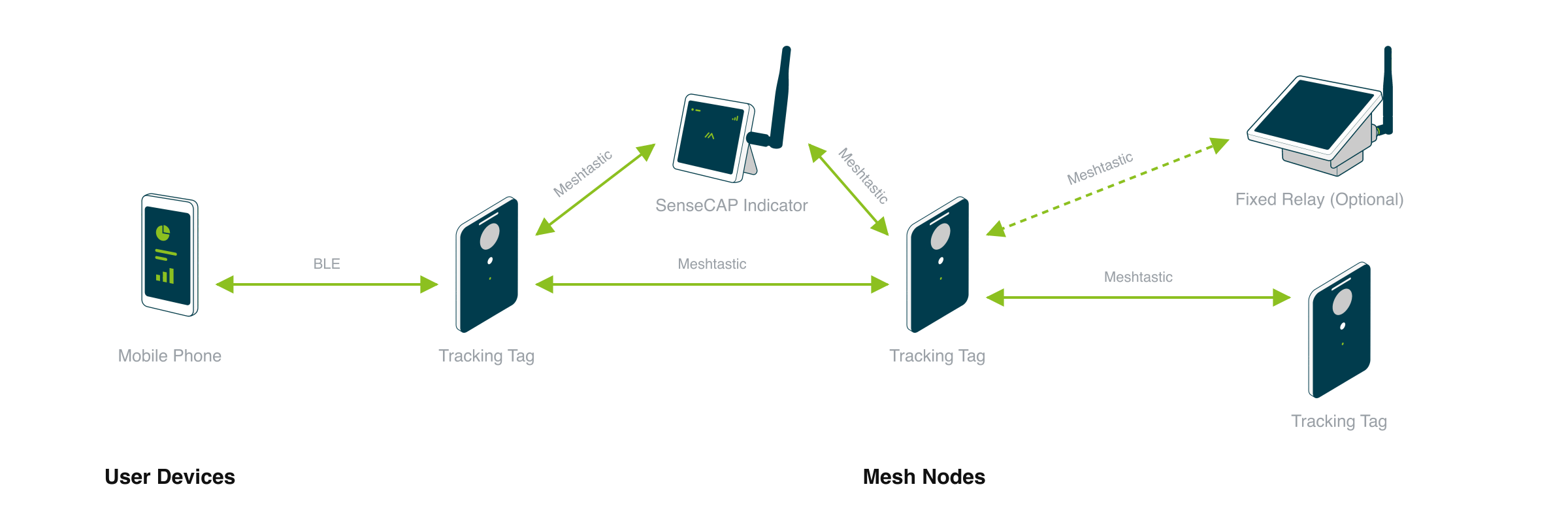
Terminal layer (personnel terminals / sensors) → relay layer (LoRa Mesh nodes forwarding hop by hop) → application layer (phone app or customer platform)
A LoRa Mesh off-grid network is made up of three device types:
Fixed relay nodes: spread the coverage
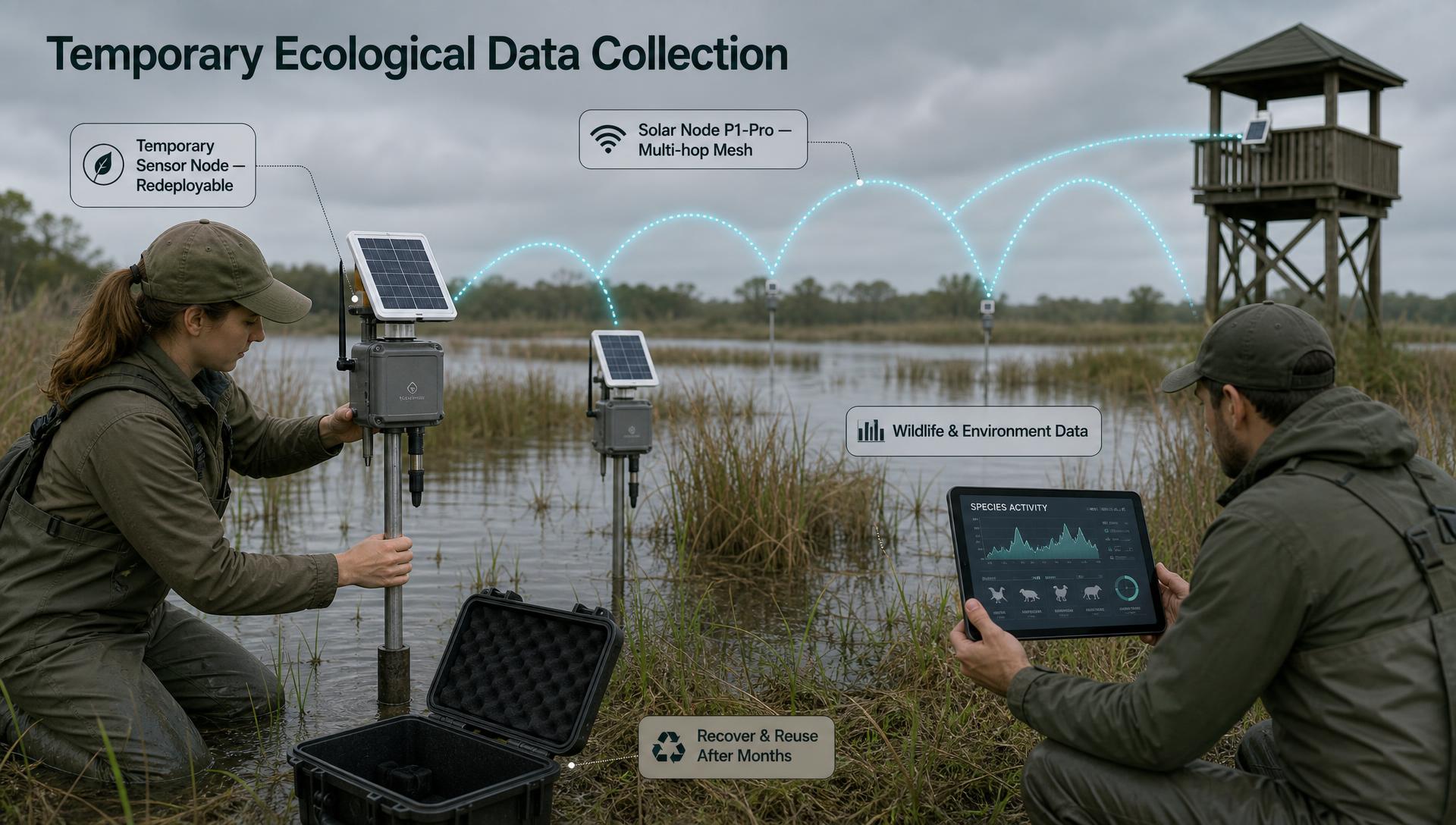
Fixed nodes mounted high forward data from personnel terminals and sensor nodes hop by hop
Mounted on ridges, rooftops or poles, always on, forwarding data for other nodes. Off-grid sites use the solar-powered SenseCAP Solar Node P1 / P1-Pro, which ship with Meshtastic firmware preinstalled.
Personnel terminals: messages and position reports
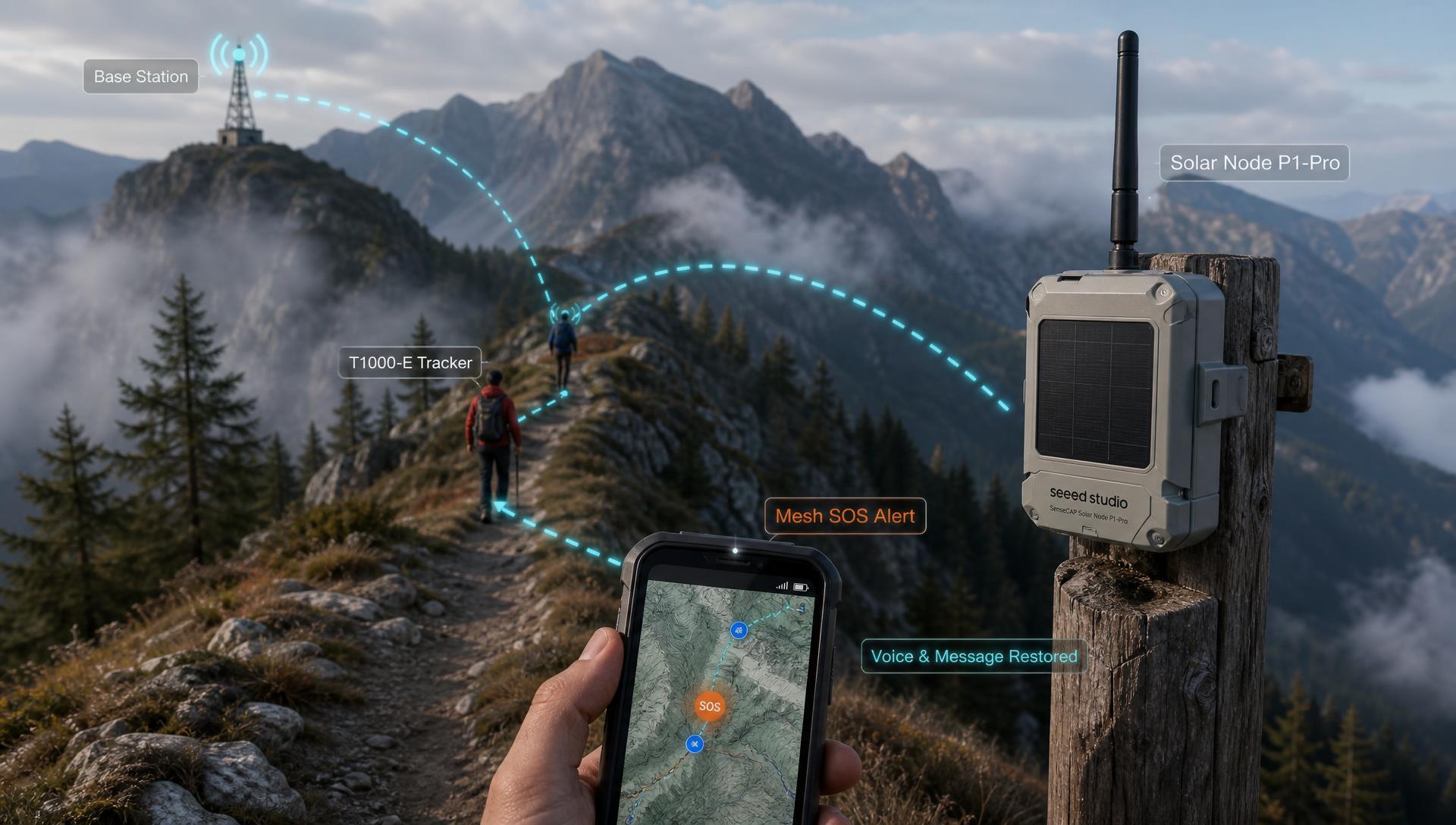
Hikers carry card terminals; the phone app shows teammates' positions
The device each person carries. SenseCAP T1000-E for Meshtastic is card-shaped with built-in GNSS. Paired with a phone over Bluetooth, it sends and receives text and shows nearby nodes and positions in the Meshtastic app. Without a phone, pressing the device button twice sends the current position.
Phone app and optional cloud platform
Meshtastic provides iOS and Android apps and a web client. In a pure mesh deployment the app is the application layer. To aggregate data on a cloud platform, add a LoRaWAN gateway; Meshtastic also supports bridging over the internet through MQTT to link distant mesh networks.
Step 1: Define the communication requirement
Before selection, confirm what data must be carried. LoRa Mesh carries text and position, not video.
| Requirement | Content | How it works | Devices needed |
|---|---|---|---|
| Text messages | Channel group chat or direct messages | Sent from the phone app through the terminal over Bluetooth | T1000-E + phone |
| Position sharing | Terminal GNSS position | Terminal broadcasts at a set interval; viewed on the app map | T1000-E (or node position from Solar Node P1-Pro) |
| Call for help | Current position + text | Press the device button twice to send position, then send a text request from the app | T1000-E + phone |
| Environmental telemetry | Small data such as temperature | Periodic node broadcast | T1000-E built-in temperature sensor; Solar Node P1-Pro accepts Grove sensors |
| Video / voice / images | — | Not supported | Use another link |
Decision rules:
- People's positions must be visible → one T1000-E per person; if only fixed points exchange messages, deploy nodes only
- A call for help needs a text description → people also carry a phone; with only a T1000-E, they can send position only
- Data must reach a customer platform → plan a LoRaWAN gateway or MQTT access point in Step 2 and confirm it has network backhaul; otherwise the app is enough
Scope. LoRa is a low-rate link and this design does not carry voice calls; for projects that need push-to-talk or real-time dispatch, the mesh can only supplement them as a position and text link.
Step 2: Plan nodes and coverage
Step 1 established where people and points are. This step decides how many fixed nodes are needed and where they go.
| Model | Positioning | Battery | Rating | Use when | Reference price | |
|---|---|---|---|---|---|---|
| Solar Node P1-Pro | GPS/GLONASS/Galileo | 4 × 18650, 3350mAh each | IPX6 | Long-term unattended relay that needs a node position | Approx. $90–105 |
| Solar Node P1 | None | Not included; supply your own 18650 | IPX6 | Budget-constrained relay without node position | Approx. $70–85 |
| XIAO nRF52840 & Wio-SX1262 Kit | None | External, as the prototype requires | No enclosure | Proof of concept, functional testing | Approx. $13–20 |
The rated single-hop distance of Solar Node in open terrain is 8–9 km; in mountains, forests and dense built-up areas the single-hop distance is much shorter.
Decision rules:
- Clear line of sight between two points, within the rated single-hop distance → one node at each end, no relay needed
- A ridge, dense forest or buildings between two points → add a relay node at a high point in between; if more than 3 hops are needed, first raise node mounting height, then consider a higher hop limit
- The relay must show its position on the map, or batteries are hard to replace at the site → choose P1-Pro; forwarding only, with batteries supplied on site → choose P1
- Fixed nodes set to the ROUTER role in Meshtastic, personnel terminals left as CLIENT or TRACKER → all devices in one network must use the same region and modem preset, or they cannot communicate
Scope. Node count cannot be derived from rated distance alone. Install two or three nodes at the planned points first, walk the coverage area with a T1000-E, then settle the total. More hops mean more forwarding and higher network load; the official documentation states the default of 3 hops suits most applications.
Step 3: Choose personnel terminals
Step 2 spread the coverage; this step settles what each person carries. Key specifications of SenseCAP T1000-E for Meshtastic:
| Parameter | Rated value |
|---|---|
| Communication distance | 2–8 km (depending on antenna, installation and environment) |
| Position accuracy | Approx. 10 m CEP |
| Button | Press twice to send position; press 3 times to toggle GPS; long press to shut down |
| Battery | 700mAh rechargeable lithium battery, up to approx. 2 days |
| Charging | Magnetic charging cable, charging temperature 0–45°C |
| Rating / operating temperature | IP65 / -20~60°C |
| Size / weight | 85 × 55 × 6.5 mm / 32 g |
| Reference price | Approx. $38–46 |
Decision rules:
- Day trips with power available each night → charge the T1000-E every night
- Multi-day activity with no fixed power en route → lengthen the position report interval in the app and plan charging for every terminal (power bank with magnetic cable); shorter report intervals mean shorter battery life
- The team already has a LoRaWAN network and does not need a mesh → choose SenseCAP T1000-E for LoRaWAN in the same form factor; it does not join a mesh
- Cold environments → operating temperature goes down to -20°C, but the charging range is 0–45°C; below 0°C, charge indoors or in an insulated space
Scope. The T1000-E connects to the phone over Bluetooth, and text depends on the phone app. When a person carries no phone, the terminal can send position only and cannot send or receive text.
Step 4: Settle power, placement and band
The first three steps set the device list; this step decides whether the devices can run on site long term. The first test is band compliance, the second is mounting height and power.
Meshtastic requires a LoRa region to be set on every device to comply with local radio regulations. Common regions:
| Region code | Frequency range (MHz) | Covered by these devices |
|---|---|---|
| US | 902.0–928.0 | Yes |
| EU_868 | 869.4–869.65 | Yes; European regions have a 10% duty-cycle limit (rolling 1 hour) |
| ANZ | 915.0–928.0 | Yes |
| JP | 920.5–923.5 | Yes |
| KR | 920.0–923.0 | Yes |
| TW | 920.0–925.0 | Yes |
| IN | 865.0–867.0 | Yes |
| CN | 470.0–510.0 | No (rated hardware range 862/863–930 MHz) |
Choose power by site:
| Site | Power | Model |
|---|---|---|
| Off-grid, long-term unattended | 5W solar panel + 18650 batteries | Solar Node P1-Pro (batteries included) / P1 (supply your own) |
| USB power available | Type-C 5V 1A | Solar Node |
| Carried by people | 700mAh built-in battery, magnetic charging cable | T1000-E |
| Prototype, indoor testing | USB or external battery | XIAO Meshtastic kit |
Decision rules:
- The target country is a "Yes" region above → set every device to the same region; Solar Node optional antennas are also band-specific (for example EU868 and US915), so confirm them when ordering
- Deployment in Europe with heavy message traffic → the 10% duty cycle limits airtime per hour; lengthen the position report interval
- Fixed node sites → mount high and keep line of sight between nodes where possible; tilt the solar panel so water does not pool; confirm the enclosure is seated and screws are tight to maintain IPX6
- Cold winter regions → the 18650 batteries used in Solar Node have a charging range of 0–50°C; below 0°C they are outside the charging range, so size winter uptime with margin on stored battery capacity
Scope. Band compliance follows the target country's radio regulations. These devices do not fit projects in mainland China, or in any country whose usable band falls outside 862–930 MHz.
For solution providers and system integrators: from proof to delivery
If this design is delivered to downstream customers, settle the following three items during selection.
Proof path. Work in two phases: first verify messages, positions and the app flow in the office with the XIAO Meshtastic kit and T1000-E; then install Solar Nodes at the planned points on the customer site for a small pilot, measure single-hop distance and hop count, and set the node count from those results. The Seeed Wiki Meshtastic introduction page collects getting-started documentation for each device.
Platform integration. In a pure mesh deployment, customers view messages and positions in the Meshtastic app. To integrate with a customer's own dispatch or management platform, confirm two things: whether data enters the platform through a LoRaWAN gateway or Meshtastic MQTT, and whether the access point location has network backhaul.
Hardware customization and volume supply. Meshtastic is open-source firmware, and nodes and terminals can be configured on top of it. For Logo, appearance, packaging and preinstalled firmware customization scope, certification coverage and lead times, see ODM/OEM customization services.
Measurement basis and comparison scope
This guide contains no measured mesh network data. Distance, battery life and position accuracy are rated values from the official wiki, product pages and datasheets. Distance depends on terrain, mounting height, antenna and modem preset; battery life depends on position interval, temperature and network coverage. Complete pilot measurements on the customer site before formal delivery.
Device data comes from Seeed's own product line. The method in this guide (define the payload, plan nodes and hops, equip personnel terminals, then check band and power) does not depend on a brand and applies equally to other Meshtastic-compatible devices.
Data sources and test conditions
- Solar Node specifications (8–9 km in open terrain, 5W solar panel, 18650 batteries, IPX6, positioning): Seeed Wiki: SenseCAP Solar Node; differences between P1 and P1-Pro from the product specification pages
- Solar Node installation and battery notes (tilted mounting, tightened screws, P1 requires your own 18650, charging temperature): Seeed Wiki: Get Started with Meshtastic Solar Node
- T1000-E specifications (communication distance, frequency, position accuracy, button, battery and battery life, IP65, size and weight): SenseCAP Card Tracker Datasheet, T1000-E page; battery life varies with temperature, installation, position interval, network coverage and sensor settings
- XIAO Meshtastic kit specifications: product specification page
- Reference prices: unit prices at the time of lookup; they vary with configuration, volume and time, and the product page is authoritative
- Hop limit, region bands, duty cycle, modem presets: Meshtastic LoRa configuration documentation
- Node roles: Meshtastic Device configuration documentation
- Encryption: Meshtastic encryption overview
- MQTT bridging: Seeed Wiki: Meshtastic introduction


