Voice-Controlled SO-ARM Robotic Arm - 1

Voice-Controlled SO-ARM Robotic Arm

Speak natural language commands to control a SO-ARM101 6-DoF robotic arm. Fully on-device voice stack — Paraformer/Matcha ASR/TTS + Qwen3-4B-AWQ on TensorRT-Edge-LLM — running on Jetson Orin NX. Exposes a HTTP observation endpoint so other solutions can read live joint state.

Intermediate30minVoice AI
Voicerobotso-armlerobotJetsonrespeakerlocal-llmqwen3edge-llmasrttsoffline

What This Solution Does

This solution makes a SO-ARM101 6-DoF robotic arm voice-controlled. Say "Hey Jarvis", give a natural-language command — the arm executes one of its configured poses or gesture sequences while the assistant talks back through your speaker.

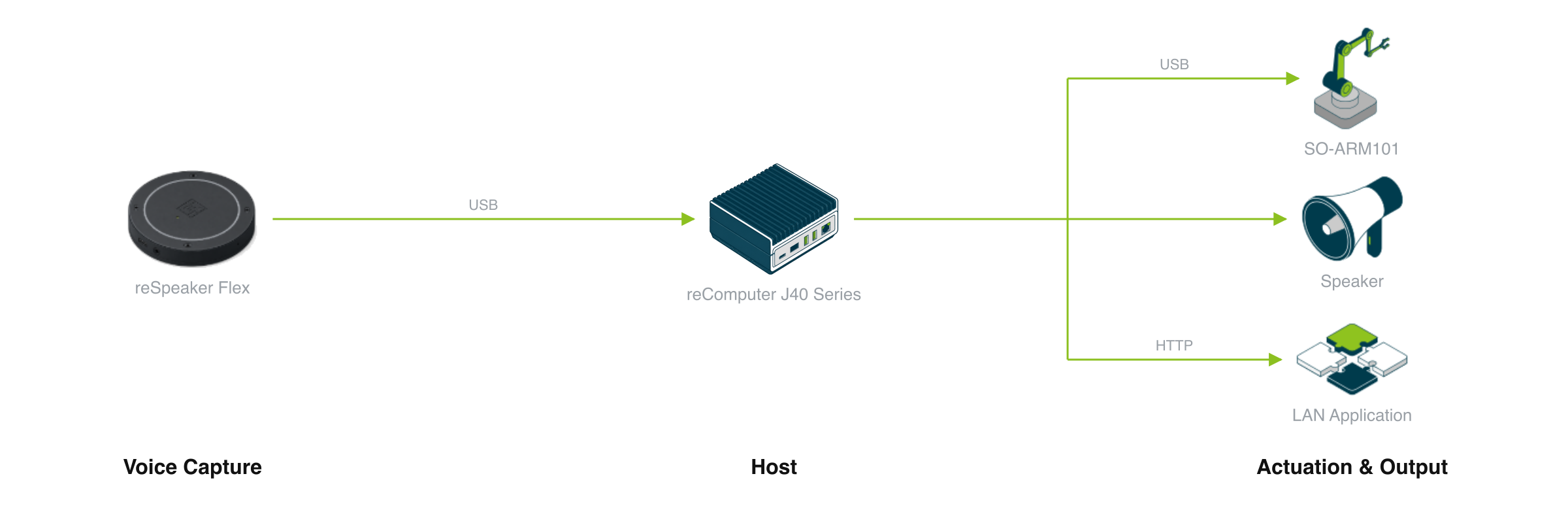
The voice pipeline runs fully on-device on a Jetson Orin NX 16GB. Three companion containers deploy together: a streaming ASR + TTS service (Paraformer + Matcha), an OpenAI-compatible LLM service (Qwen3-4B-AWQ on TensorRT-Edge-LLM), and the voice-arm container that ties them together and drives the SO-ARM. No cloud API key, no usage caps, no internet dependency at runtime. Action poses (a named library of joint-angle sets) and the LLM system prompt are exposed as editable YAML files, so non-developers can add new poses or change how the arm interprets phrases without rebuilding the image. The container also exposes a small HTTP server that any other solution can poll for live joint state.

Core Benefits

  • Hands-free arm control — Say "wave" / "pick up" / "go home" and the arm moves; no teach pendant, no Python REPL
  • Customizable without code — Action poses (actions.yaml) and LLM prompt rules (prompt.yaml) are plain YAML, editable from device settings
  • Integrable — Live joint state served at GET /observation for other solutions (digital twins, recording tools, safety supervisors) to consume
  • Voice feedback — Matcha-TTS speaks confirmations and answers back through your speaker, generated locally on the Jetson GPU
  • Fully local, no usage caps — Speech and LLM inference run on-device; nothing leaves the Jetson once images are pulled

Integration Scenarios

ScenarioDescription
Voice-driven demosRun interactive product demos at trade shows / training labs without operator intervention
Robotics educationPair with a curriculum to teach voice AI + robotics in one project students can talk to
Teleoperation supervisorUse voice commands to drive supervisory actions while a higher-level controller handles trajectories
Multi-solution compositionOther solutions consume GET /observation to record demonstrations, visualize the arm in a digital twin, or run safety checks
Accessibility researchExplore hands-free robotic manipulation for assistive use cases

Interfaces Exposed

EndpointPurpose
GET http://<jetson-ip>:8765/observationLatest joint positions + gripper state, flat JSON
GET http://<jetson-ip>:8765/observation/schemaField-type schema for the observation payload

These endpoints are polled by the verify panel during deployment, but any external system on the same network can read them.

What You Need

Hardware

PartPurpose
SO-ARM101 Follower Arm6-DoF arm — receives send_action calls from the container
reComputer Super J4012Jetson Orin NX 16GB — runs the voice + arm container
reSpeaker Flex XVF38004-microphone array for far-field voice capture
SpeakerAudio output for the assistant's voice replies
USB-C cablesJetson ↔ SO-ARM, Jetson ↔ reSpeaker

Software & Accounts

  • Docker with NVIDIA runtime, available by default on JetPack 6.x (l4t-jetpack r36.x)
  • Internet on the Jetson for the first boot only — to pull the voice + LLM images (~10 GB) and download the Qwen3 TensorRT engine artifact. Subsequent boots are fully offline.

Usage Notes

  • First boot takes 5-10 minutes — Image pulls, model download, and the Qwen3 TensorRT engine warmup run only on first start. Subsequent restarts are seconds.
  • Single-arm scope — One container instance controls one arm via one USB serial port. Multiple arms = multiple containers + multiple ports.
  • Local-only inference, no API keys — ASR, LLM, and TTS all run inside containers on the Jetson. No cloud account, no per-call cost, no rate limits.
  • Speakers required — Voice feedback is core to the UX; the arm replies before it moves.
  • Customizing without rebuilding — Edit actions.yaml to add new poses, or prompt.yaml to teach the LLM new phrases — go to Devices → Voice Brain → Configure after deployment.

Integration Interfaces

http

Latest robotic-arm observation (flat JSON map of joint positions and gripper state)

/observation · Port: 8765 · Method: GET
{"shoulder_pan.pos":0.12,"shoulder_lift.pos":-0.34,"elbow_flex.pos":0.45,"wrist_flex.pos":0.0,"wrist_roll.pos":0.0,"gripper.pos":0.1}
http

Field-type schema for the observation endpoint (drives the robot_inspect verify panel)

/observation/schema · Port: 8765 · Method: GET
{"shoulder_pan.pos":{"type":"float","range":[-1.0,1.0]}}

Usage Requirements

audio

reSpeaker Flex XVF3800 USB microphone array for voice capture

audio

Speaker for TTS voice feedback

usb

SO-ARM101 6-DoF follower arm connected via USB serial (typically /dev/ttyACM0)

network

Internet on first boot to pull the voice + LLM container images and warm up the TensorRT engine. Online API access is NOT required at runtime — inference is fully local.

Deployment Options

Contact Us
We Are Glad to Be Your Hardware Partner !
Next
Voice-Controlled SO-ARM Robotic Arm