Retail Voice
Turns in-store conversations into searchable text.
Store, meeting, consultation speech becomes back-office text. Mic array and on-site transcriber, or reSpeaker Clip and phone. Names, numbers masked before storage, deletable on request.
Intermediate60minAcoustic & Audio AI
Reusable Site Templates
Places where people speak within about 3 m of the microphone and the talk should be kept as text.
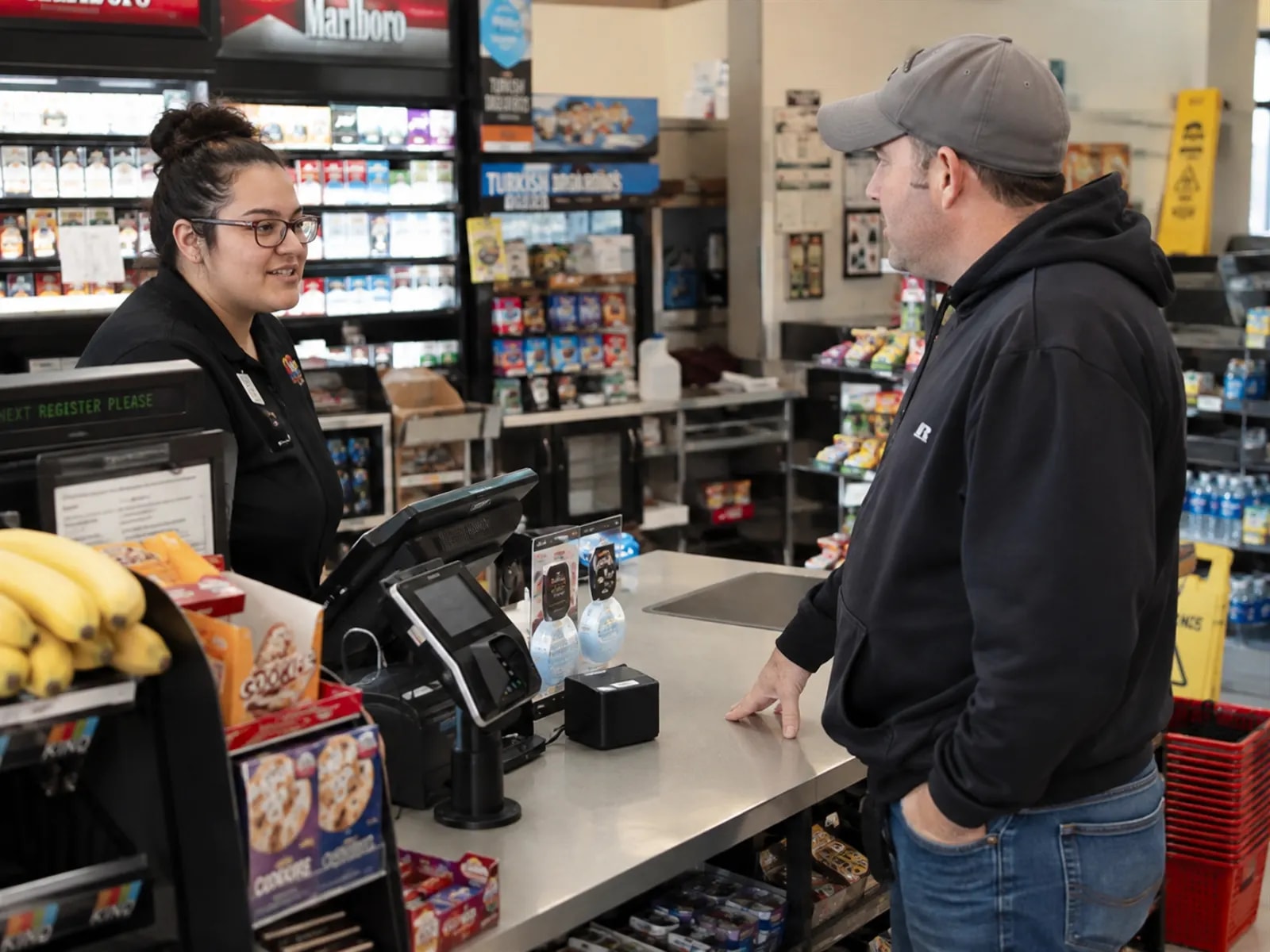
Chain-store service checks
Convenience-store tills, phone-shop and pharmacy counters. Staff and customer talk is stored as text per store.

Meetings and training
Meeting rooms and training classrooms. One array on the table, and what is said is archived as text.
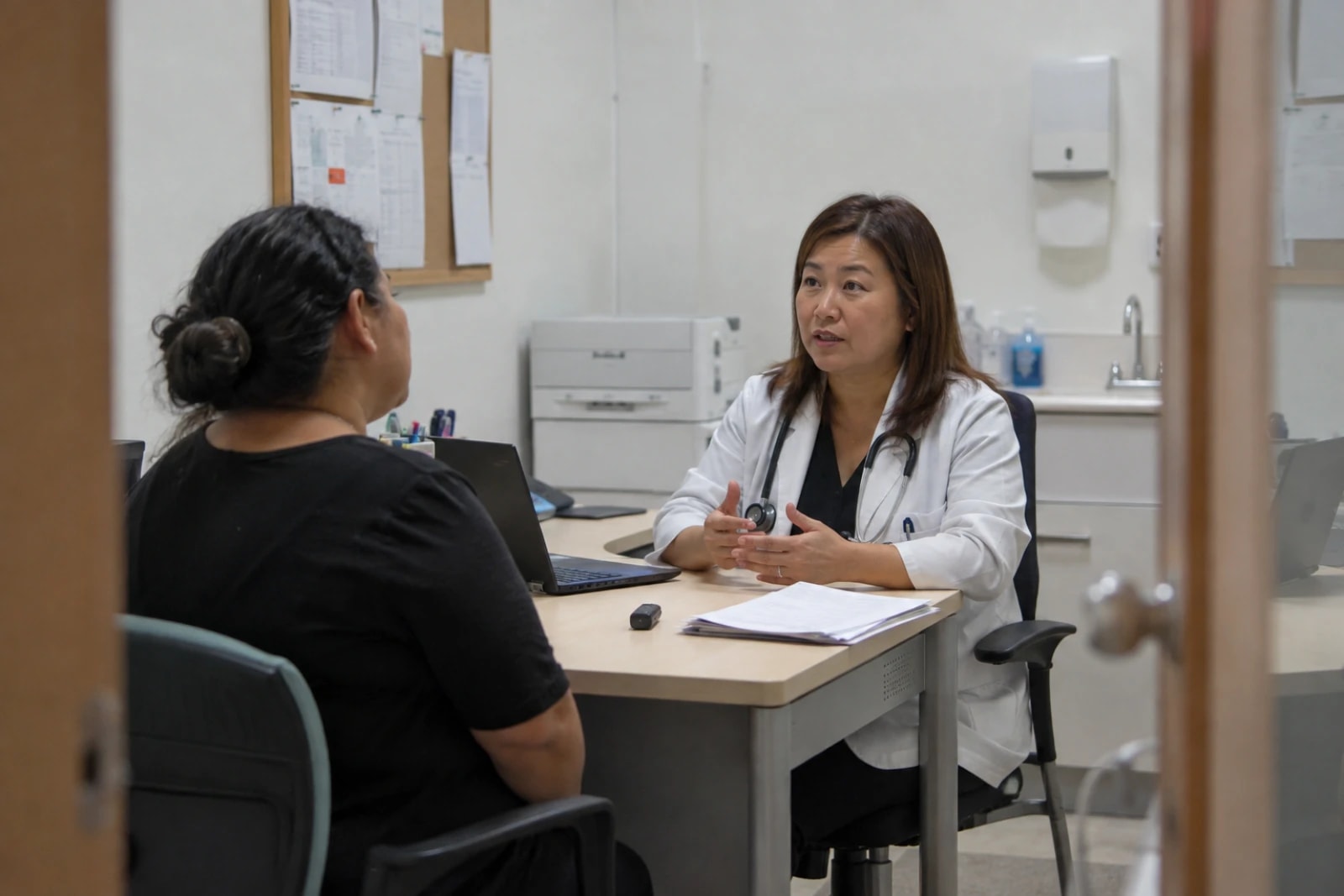
Consultations
Clinic rooms, insurance and advisory booths. One-to-one talk is kept as text, and a deletion request removes record and audio.
Not a fit: rooms beyond about 3 m, identity checks from a speaker label, or a compliance certificate. Above 70 dB of steady background noise, errors rise above the measured figures.
How it works
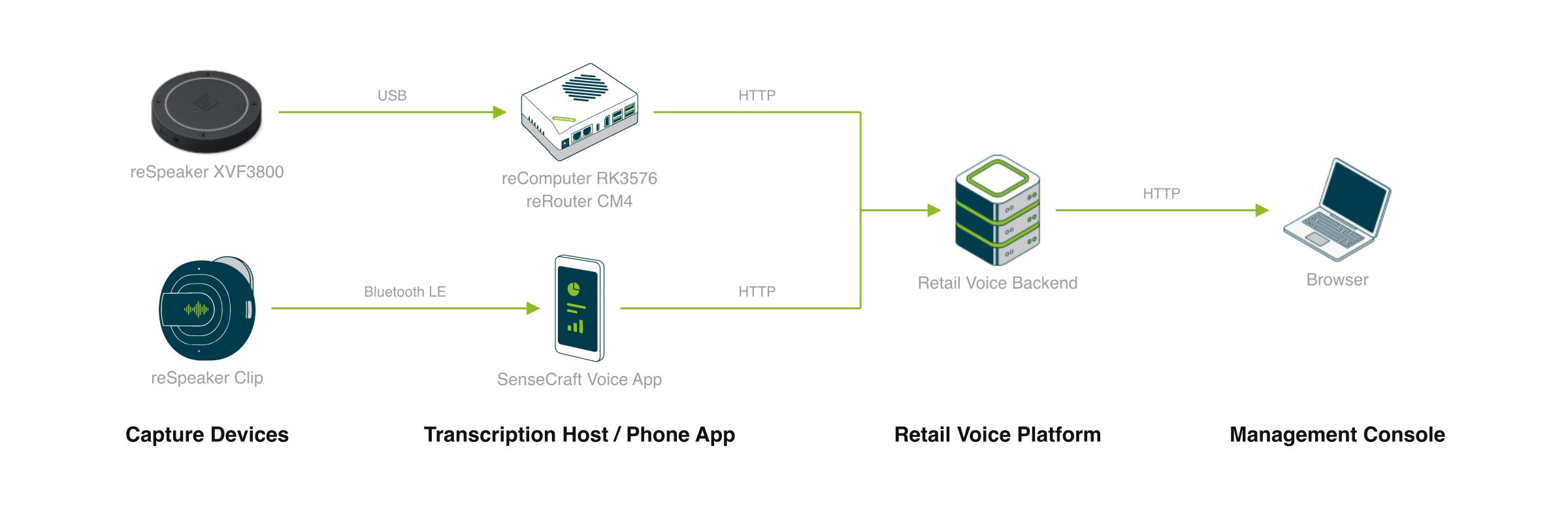
A reSpeaker XVF3800 array feeds a transcription host (reComputer RK3576 or reRouter CM4), or a reSpeaker Clip captures through a phone app. Both routes write into the same retail voice backend.
Audio is captured two ways: a USB microphone array on a transcription host, or reSpeaker Clip with a phone. The host transcribes on site and uploads text; the phone uploads audio for recognition on the server. Both paths end in the same retail voice backend, viewed in the management console.
Capture Devices
One reSpeaker XVF3800 on a USB host port. Echo cancellation, beamforming and noise suppression run on the array's own DSP, so the box receives one 16 kHz mono stream and spends no CPU on it.
- Background noise at or below 70 dB — above that, the array cannot separate the speaker from the room and errors rise.
- Speaker within about 3 m — further out, transcription degrades whichever box you bought.
- One array covers one talking area — a second counter needs a second array and a second box.
On the other path a reSpeaker Clip records the conversation instead of the array.
Transcription Host / Phone App
Voice activity detection, recognition, punctuation and the optional speaker embedding all run on this box.
| Host | Where ASR runs | Model | Memory with everything loaded | Measured |
|---|---|---|---|---|
| reRouter CM4 | 4× Cortex-A72 CPU | Paraformer streaming | pilot on site | Speaker embedding only (A72 class) |
| reComputer RK3576 | 6 TOPS NPU | SenseVoice RKNN fp16 | 1.71 GiB | ASR, streaming latency, memory, restart |
Punctuation and the speaker embedding each load their own model, and either can be turned off at deploy time.
On the Clip path, SenseCraft Voice App on the phone pairs with Clip over Bluetooth LE and uploads the audio; no transcription host is needed.
Retail Voice Platform
Both paths write to the same retail backend. What differs is where recognition runs.
- On-Device Transcription — the host transcribes locally and uploads only the finished text; when the uplink drops, it uploads once the connection is back.
- Clip and phone — the backend transcribes the uploaded audio, then redacts and stores the text.
The backend host also runs the database, object storage and the management console opened in a browser, so it needs 20 GB free; the images are arm64 only. The data interface is listed under What You Get below.
How well it works
What the store sees and does in the browser console once it is running.
Measured results
ASR only, measured on reComputer RK3576 — upload, redaction and storage are not included in the latency rows.
| What the store gets | Typical | Device |
|---|---|---|
| End of speech to the final text, 12 concurrent channels | 1,067 ms p95 (583 ms p50) | reComputer RK3576 |
| Chinese recognition error (100 AISHELL-1 utterances) | 4.82% CER | reComputer RK3576 |
| Data left behind after deleting one person's records | 0 across the database, the object store and local audio | Server Stack preset |
| Personal details caught by redaction | 0.98 precision / 0.95 recall | Server Stack preset |
Keep steady background noise at or below 70 dB and the speaker within 3 m of the array; beyond either limit, errors rise above these figures.
The transcript folder on the box is never rotated, so set a retention period before the deployment runs for months. Raw audio on the stack is kept for 24 hours by default (6 or 1 hour at deploy time) and is not redacted.
Per-host channel counts and test conditions are detailed in Engineering Wiki · Retail Voice Intelligence (available upon documentation release).
What you get out of it
Once deployed, these are the interfaces a store system connects to.
| Interface | What it carries | Path |
|---|---|---|
Transcript files <output-dir>/cache/asr/<id>.json | One JSON per finished sentence: text, timestamps, language, speaker label when voiceprint is on | On-Device Transcription |
Streaming ASR ws://<device-ip>:8621/asr/stream | PCM in; transcript, punctuation and a 192-dim speaker embedding out | On-Device Transcription |
Offline ASR POST http://<device-ip>:8621/asr | Whole-file transcription | On-Device Transcription |
Local web page http://<device-ip>:8090/ | Live transcript, microphone status, voiceprint registry — store LAN only | On-Device Transcription |
Audio upload POST :18621/v1/audio/transcriptions | SenseCraft Voice App uploads audio; the platform transcribes, stores and displays it | Clip / Server Stack |
Recordings :8081/api/v1/recordings | Ingest (operator) and query (viewer); text is redacted before the insert | Server Stack |
Erase and export :8081/api/v1/privacy/erase, /export | Admin only: hard delete across stored audio, rows and voiceprint; redacted export with an audio manifest | Server Stack |
Admin console :3000 | Recordings, keywords, devices, export and delete | Server Stack |
Stored text carries placeholders such as [[NAME]] in place of names and numbers, and the original text is not written anywhere. Speaker labels appear only when voiceprint matching is on, and they are registry labels, not identities.
Porting It to Your Own System
The reusable unit is the chain capture → recognition → redaction before storage → erasable records. Only the language-bound parts change for a new site: the recognition model, the speaker registry and the redaction rules.
| Layer | What porting costs you |
|---|---|
| Array placement rules (≤3 m, ≤70 dB) | reuse as-is |
| Capture client, voice activity detection, the two runtimes | reuse as-is |
| Output contract and access roles (viewer / operator / admin) | reuse as-is |
| Redaction before insert, and the erase order (audio → rows → voiceprint) | reuse as-is |
| Recognition model and language | swap for the target language or domain |
| Speaker registry, matching threshold, redaction word lists | re-tune per language and jurisdiction |
| The gold set behind the precision / recall figures | collect your own |
Same-shape uses: front-desk logs, consultation notes, control-room speech kept on site, on-premise call quality review, field-service voice notes.
Where this shape does not fit
- Identity verification. A speaker label is a clustering result against a local registry; never use it to gate access or payment.
- Far-field or noisy rooms. Beyond about 3 m or above about 70 dB the front end is the limit, and no compute board recovers it.
- Proving what was said is gone. Only text is redacted, raw audio stays intact for the retention window, and numbers read out as words are caught only for 11-digit Chinese mobile numbers.
How to deploy
Tell us about your site — we work out the hardware, then you connect the data and follow the steps.
Text Destination
Where does the text have to end up? This is the decision that separates the two presets.
Or compare them yourself: preset specificationsDeployment Guide · 60min →
| Setup | Role | Device | Qty |
|---|---|---|---|
| Transcribe on the device | Edge Device | reComputer RK3576 Series / reComputer RK3588 Series / reComputer J30 Series (Jetson Orin Nano) / reComputer J40 Series (Jetson Orin NX) / reComputer Industrial R20 Series / reRouter CM4 Series(either one) | 1 |
| Microphone Array | reSpeaker XVF3800 4-Mic Array | 1 | |
| Clip and phone, server transcription | Stack Host | reComputer RK3576 Series / reComputer RK3588 Series / reComputer J30 Series (Jetson Orin Nano) / reComputer J40 Series (Jetson Orin NX) / reComputer Industrial R20 Series / generic_linux_host(either one) | 1 |
| Capture Source | reSpeaker Clip / external_mobile_app(either one) | 1 | |
| Microphone Array | reSpeaker Clip | 1 |
| Preset | Audio comes from | Transcripts end up in | Boards | Measured on hardware |
|---|---|---|---|---|
| On-Device Transcription | A reSpeaker XVF3800 on the box | Finished text JSON uploaded to the retail backend; optional WAV kept on the box | reRouter CM4 (CPU) or reComputer RK3576 (NPU) | RK3576: latency, memory, restart. CM4: speaker embedding only |
| Server Stack | The same array on an edge collector, or a phone app (SenseCraft Voice App with reSpeaker Clip) | Redacted text in the database; raw audio under a retention window; admin console with erase and export | reComputer RK3576, or another arm64 Linux host | Deletion residue, redaction precision / recall, access control — in an integration test, not a store |
Both presets are badged Beta and rated intermediate. On-Device Transcription takes about 40 minutes once models are downloaded; the Server Stack about 60 minutes, mostly image pulls.
Both end in a manual check: someone speaks a sentence and reads the result.
FAQ
Both write to the retail backend; they differ in where recognition runs. On-Device Transcription recognises speech on the box and uploads finished text, while the Clip path uploads audio through the phone for server-side recognition, redaction and storage.
Recognition on the box keeps working once images and models are in place, but finished text still needs the retail backend to be stored and displayed. The Clip path also needs the phone's upload route. Models download from the chosen mirror at first start.
On-Device Transcription uploads text only; WAV segments stay on the box and are written only while file output is on. On the stack, raw audio sits on the stack host for 24 hours by default. A separate cloud-analytics profile is off by default, and turning it on sends redacted text off the host.
On reComputer RK3576 with 12 concurrent channels, end of speech to final text is p50 583 ms / p95 1,067 ms, and Chinese error is 4.82% CER. These figures cover recognition only, not upload, redaction or storage. The hardware run fed audio as files, so the array's beamforming and echo cancellation were not part of it.
On the Server Stack, one admin erase request scoped by person, device or session removes stored audio first, then the text rows, then the voiceprint, and leaves a record with no original values. In the packaged integration test, residue in all three stores was 0. On-Device Transcription has no deletion API; the transcript folder is yours to prune.
On a 114-sample Chinese and English gold set, precision is 0.98 and recall 0.95, measured on written text. Recognition errors can shift entity boundaries, and low-confidence entities are flagged for review rather than masked. It is a reproducible test, not a compliance certification.
No. The label comes from matching a voice against a local registry with a fixed threshold; it separates turns in a conversation and is not identity verification. Speaker matching is also off in a default Server Stack deployment.
The model and component licences, each under its own upstream terms; on the stack, MySQL is GPLv2 with the FOSS exception and MinIO's current releases are AGPLv3. Whether recording in your store is lawful, and what notice you owe, is your responsibility.
Didn't find your answer?
Contact Us
We Are Glad to Be Your Hardware Partner !