Voice-Controlled LeKiwi Robot - 1

Voice-Controlled LeKiwi Robot

Control a 3-wheeled Kiwi-drive robot with your voice using Groq AI. Say "Hey Jarvis" and give natural language commands to drive, steer, and move hands-free.

Intermediate30minVoice AI
Voicerobotlekiwiesp32raspberry-pirespeakergroqLLMasrtts

What This Solution Does

This solution turns your LeKiwi robot into a voice-controlled companion. Speak natural commands like "move forward" or "turn left" — the robot understands, replies with a voice confirmation, and moves. No remote, no phone app, no keyboard. Just talk.

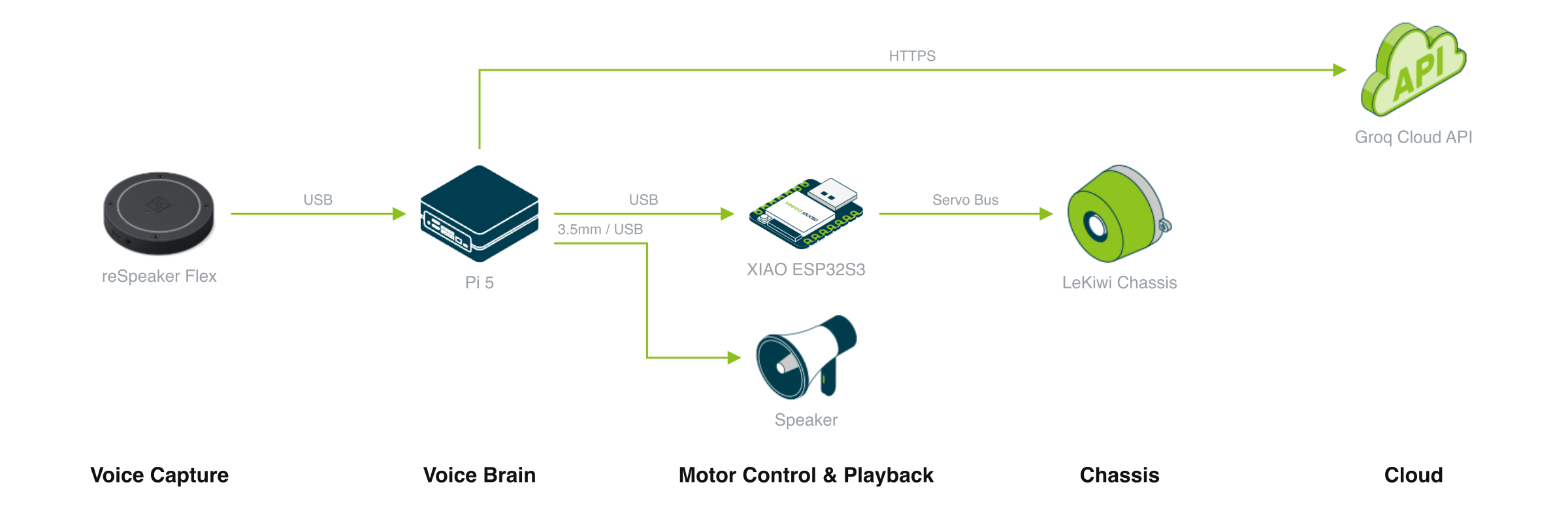
Everything runs on a Raspberry Pi — it listens for your voice, understands what you want, decides what to do, and talks back through speakers. A XIAO ESP32S3 controls the motors that drive the wheels. The guided deployment walks you through firmware flashing, servo ID setup, and the voice container.

Core Benefits

  • Hands-free control — Say "Hey Jarvis" and give a command. The robot listens, understands, and moves
  • Natural language — No memorizing keybindings. Just speak what you want — "go forward", "slide left", "keep turning"
  • Voice replies — The robot talks back. You'll hear confirmation and status through speakers
  • Omnidirectional movement — Kiwi-drive lets the robot move forward, backward, strafe, and rotate seamlessly

Use Cases

ScenarioDescription
STEM educationTeach robotics, AI, and voice technology with a hands-on project students can literally talk to
Robot prototypingBuild a voice-controlled platform as a base for delivery robots, inspection bots, or companion robots
Interactive demosShowcase AI integration at events — visitors can talk to the robot and see it respond
Accessibility researchExplore hands-free robot control for assistive technology applications
Home automationExtend with sensors and additional commands to create a voice-controlled home robot

What You Need

Hardware

PartPurpose
LeKiwi Kit3-wheeled Kiwi-drive chassis with 3× STS3215 smart servos
XIAO ESP32S3Motor controller — receives serial commands from Raspberry Pi
Raspberry Pi 5Voice AI brain — runs the full voice pipeline
reSpeaker Flex XVF38004-microphone array for far-field voice capture
SpeakerAudio output for the robot's voice replies
USB cablesPi ↔ XIAO, Pi ↔ reSpeaker, Pi ↔ power

Software & Accounts

  • Docker on the Raspberry Pi
  • Groq API key (free tier — sign up at console.groq.com)

Usage Notes

  • Hardware assembly is required — physically build the LeKiwi chassis first; servo IDs are configured through the XIAO in Steps 2 and 3
  • Groq free tier is enough — the free API quota handles casual use with no issues
  • Internet required — voice recognition and LLM run on Groq's cloud, so the Pi needs internet
  • Speakers needed — the robot talks back, so audio output is essential for the full experience
  • Servo power — the STS3215 servos need external power (not just USB)

Usage Requirements

audio

reSpeaker Flex XVF3800 USB microphone array for voice capture

audio

Speaker for TTS voice output

usb

XIAO ESP32S3 connected to Raspberry Pi via USB-C for serial motor control

network

Internet access for Groq API (Whisper STT, Llama 3 LLM, Orpheus TTS)

Deployment Options

Contact Us
We Are Glad to Be Your Hardware Partner !
Next