Rework on vision-based security projects rarely starts in the algorithm. It starts at hardware selection: the box arrives on site and runs fewer streams than planned. The usual cause is three parameters that were never confirmed together — model size, target frame rate, and video decode ceiling. Get any one of them wrong and the real channel count halves.
This article lays out a four-step selection method, with per-device channel estimates under one benchmark, interfaces and RTSP decode ceilings, plus thermal and power specs for seven edge devices. The channel figures are estimates, not measured acceptance values — the measurement basis and comparison scope are at the end.
Quick answer
A summary of what the rest of the article derives. Benchmark: YOLOv8m, 1080p, 15 FPS, int8 quantisation, 640×640 input.
| Channels | Device | Deployment form | Basis for the estimate | |
|---|---|---|---|---|
 | 1 | reCamera 2002 series | All-in-one AI camera | 1 TOPS, 1 stream on-device, no separate compute box |
 | 2–3 | reComputer R2130 | Detached edge compute box | RPi 5 + Hailo-8, 26 TOPS; decode ceiling ~4 streams |
 | ~4 | reComputer J3011 | Detached edge compute box | Orin Nano 8G, 40 TOPS; decode ceiling 11 streams |
 | 5–7 | reComputer J4012 | Detached edge compute box | Orin NX 16G, 100 TOPS; decode ceiling 18 streams |
 | 8–15 | reComputer J5012 | Detached edge compute box | AGX Orin 64G, 275 TOPS; decode ceiling 44 streams |
| 16+ | Multiple J5012, or J4012 in groups | Units in parallel | A single J5012 tops out around 15 streams of inference |
Three conditions change the table above:
- Target frame rate above 30 FPS — halve the channel counts. Most security events (intrusion, a fall, a missing hard hat) last for seconds, so 15 FPS captures them; dropping the requirement from 30 to 15 typically halves the hardware budget
- Dusty site or a high ingress-protection requirement — pick the Industrial (fanless) variant at the same compute tier: fully sealed enclosure, wide-range DC input
- Long-run automotive-grade cameras — only reComputer J5012 offers GMSL (×8 via the add-on board); every other model needs Ethernet or MIPI CSI
If you already know your camera interface and channel count, the configurator below generates the device list directly. If you want to see where these numbers come from, read on.
Why inference belongs on the edge
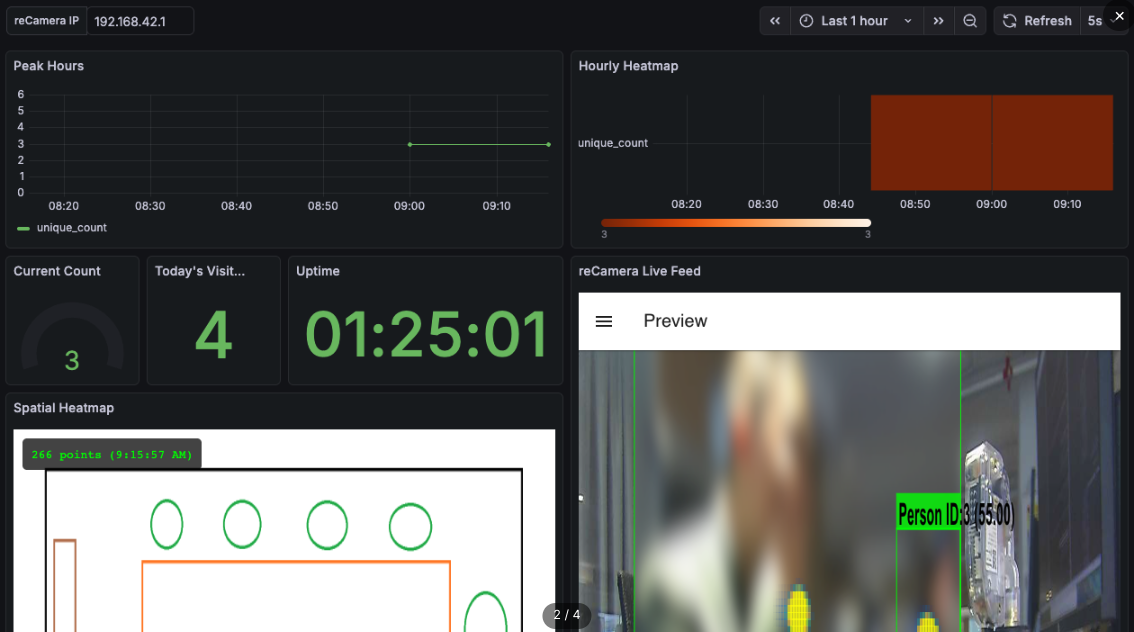
On-device output is a structured business metric, not a video stream waiting for a human to watch it
All four steps below assume inference runs locally on the device. Compared with shipping video to the cloud for analysis, edge deployment differs in three ways.
Bandwidth drops by two orders of magnitude. The stream is analysed locally and what goes upstream is event metadata — time, location, event type — at tens of KB per event instead of a continuous video upload.
Sensitive footage never leaves the device. On-device redaction is supported and video never crosses the public network, which shortens the privacy-compliance argument considerably.
Detection and alerting survive a network outage. Detection, recognition and alerting all complete on the device, which can drive a local siren or door controller directly; event data is backfilled once the link returns. In security work the outage window is exactly when the system is needed most.
System anatomy and three vision capabilities
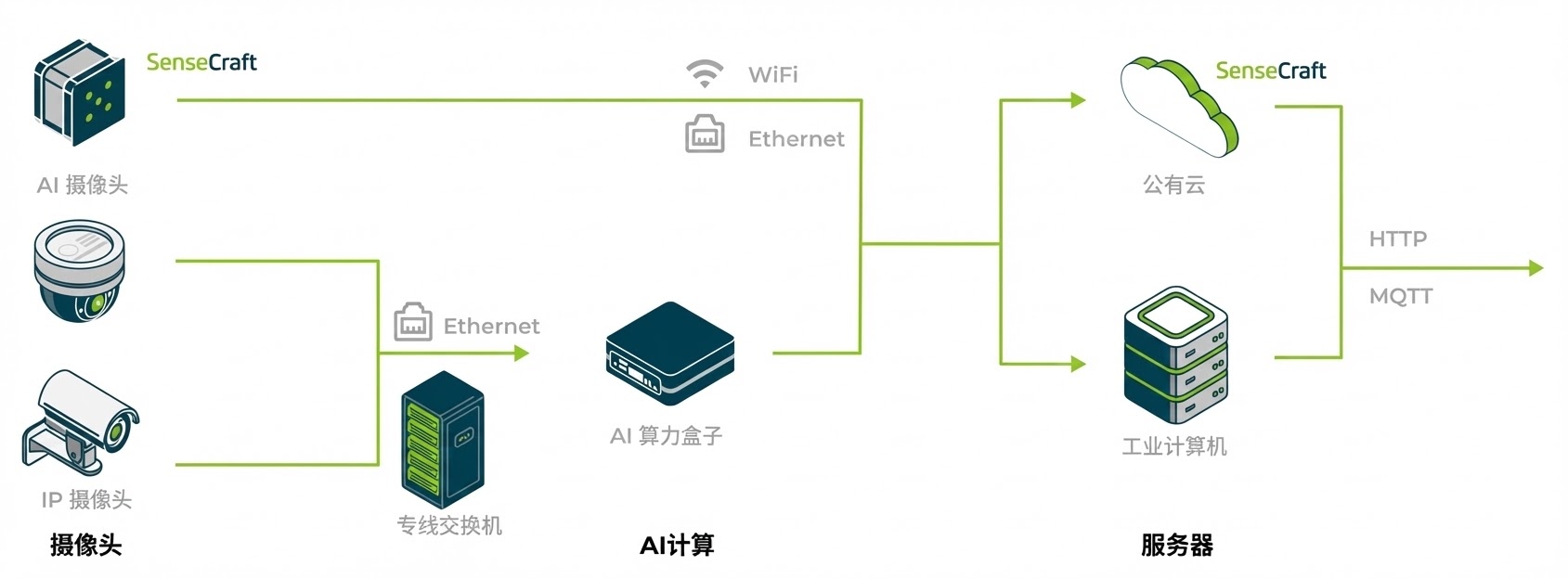
The four roles in an edge vision analytics system: cameras, AI compute, network, cloud
By where the compute sits, edge vision systems take three deployment forms:
- All-in-one AI camera — capture and inference in one device, no separate compute box. Single-point monitoring, 1 stream
- Detached edge compute box — reuse existing IP cameras, video arrives over Ethernet as RTSP, compute is consolidated in a standalone unit. This is the common case; anything from 2 to a dozen-plus streams follows this path, sized by compute and decode ceiling
- Camera-direct compute unit (GMSL) — cameras connect to the compute unit over coax rather than Ethernet. An automotive-grade link: interference-resistant with stable latency, suited to robotics, AGVs and in-vehicle work where real-time behaviour and link reliability matter, or where site networking is unreliable. Among the devices covered here, only reComputer J5012 provides GMSL (×8 via the add-on board)
Security work draws on three capability classes, in increasing order of compute cost.
People and vehicle detection with zone control: perimeters, restricted areas, headcount
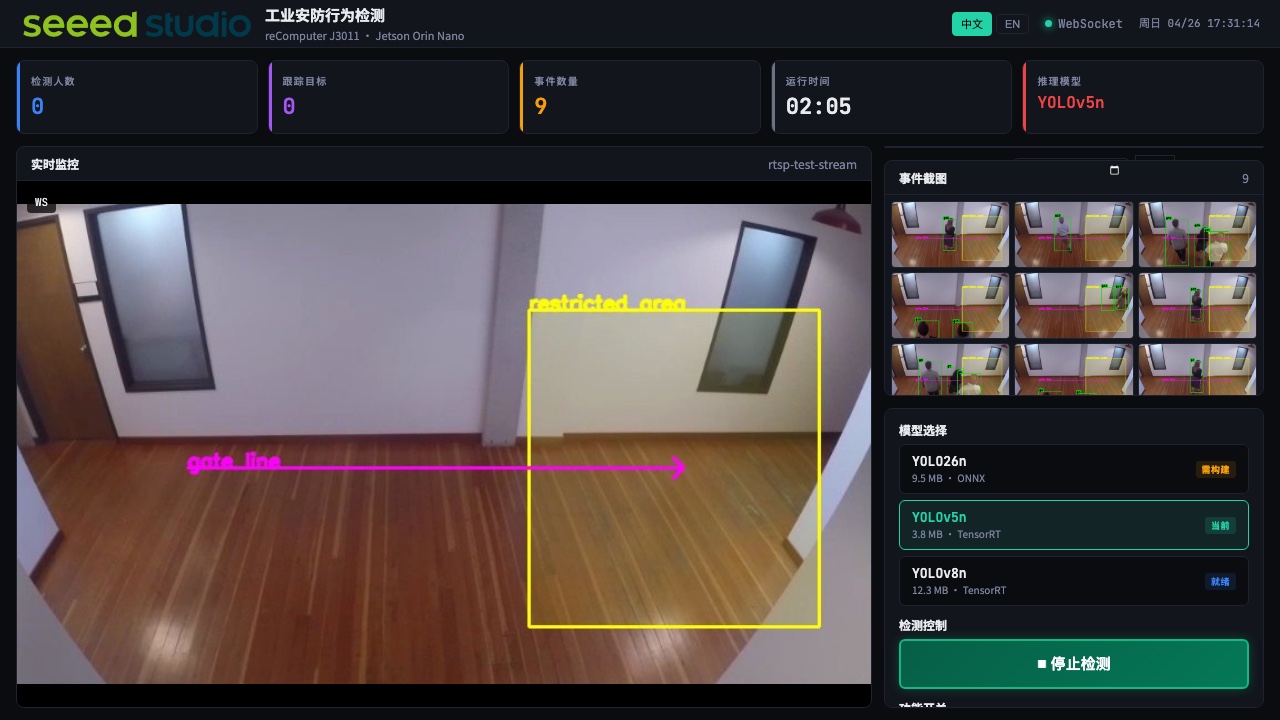
YOLO-family models identify the position and count of people, vehicles and objects in frame; the general model covers 80+ COCO classes out of the box. Perimeter intrusion, restricted-area entry, line-crossing alerts and entrance headcount all build on this.
Paired with tracking, it also yields bidirectional in/out counts, ID tracking, dwell time and zone heatmaps — dwell time flags abnormal loitering, heatmaps reveal gaps in patrol coverage. These are structured metrics a security platform can consume, not footage that needs watching.
PPE and violation detection: hard hats, hi-vis vests, restricted zones
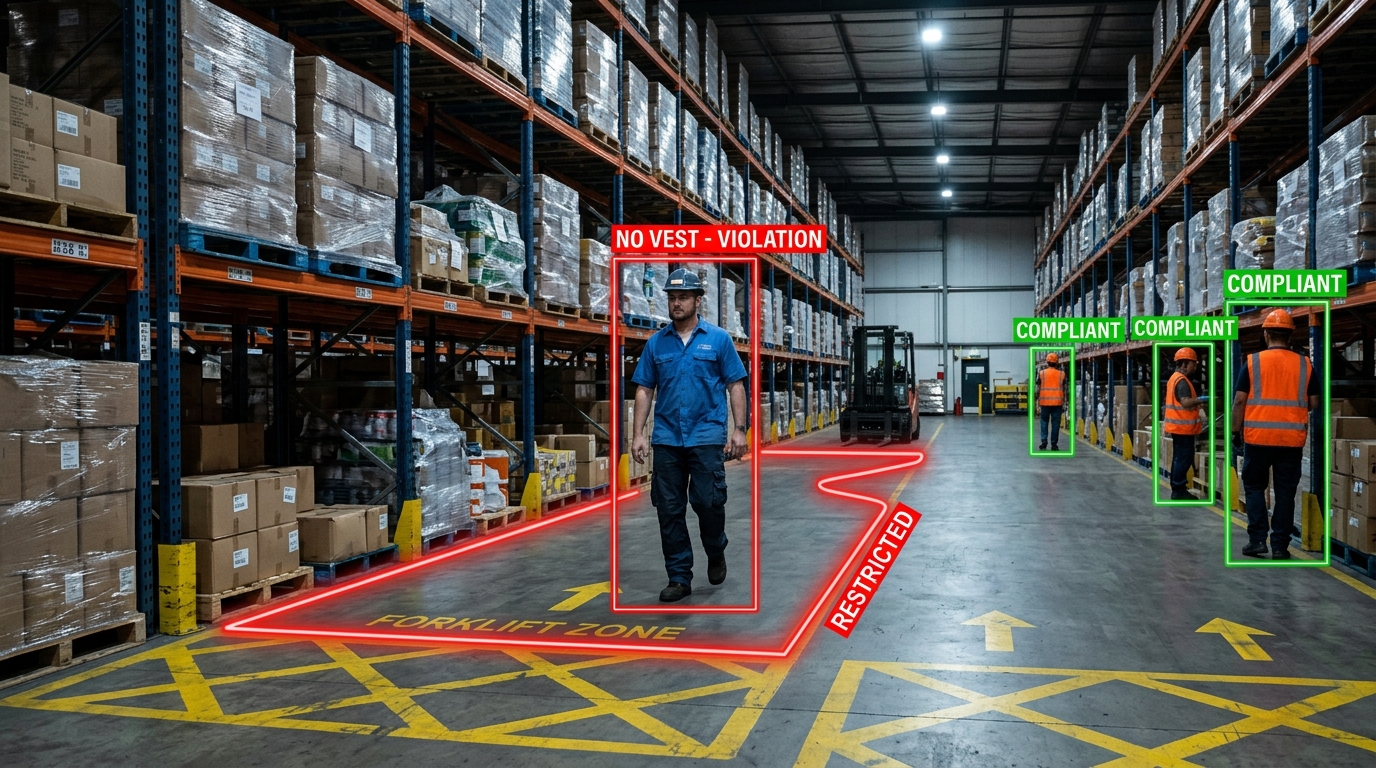
Detects whether people are dressed and working to procedure: no hard hat, no hi-vis vest, missing required protective equipment, entering a marked hazard zone.
This class does not require building a dataset from scratch. The usual approach is to fine-tune on an open dataset with a few hundred to a few thousand additional images from the site itself — the added samples adapt the model to local dress codes, camera angles and lighting, at a fraction of the data needed to train from zero. How many you actually need depends on how distinguishable the target class is and how complex site conditions are.
Pose and anomalous events: falls, prolonged immobility, unusual gatherings
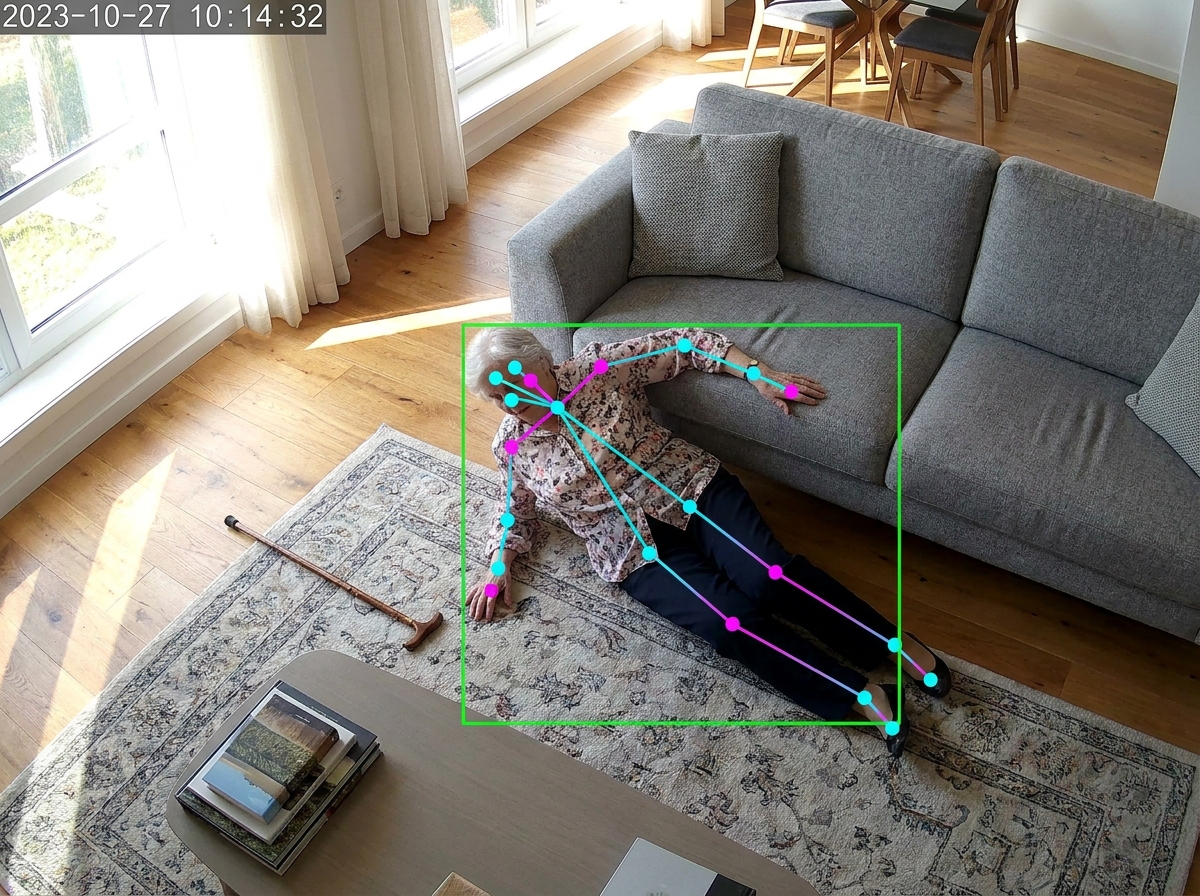
A fall is judged from the spatial relationship between keypoints, not by classifying the frame as a whole
Falls, prolonged immobility and unusual gatherings are detected through human pose estimation, judged from the spatial relationship between joint keypoints rather than by a classifier labelling the whole frame. That implementation holds up better at night, under occlusion and with several people in frame than a pure classification approach.
Step 1: Fix the task type and performance target
Three parameters need to be settled before selection begins:
| Parameter | Values | Effect on selection |
|---|---|---|
| Task type | Detection / tracking / pose / segmentation | Sets model size, and therefore per-stream compute cost |
| Target frame rate | 15 FPS or 30+ FPS | Decides directly whether channel counts halve |
| Latency requirement | Local alert / cloud upload | Decides whether edge inference is mandatory |
Frame rate has the largest effect and is the most commonly overestimated. Security events last for seconds, so 15 FPS captures them in full; 30 FPS is normally a hard requirement only in cases such as high-speed production-line inspection.
Step 2: Fix the camera interface and decode ceiling
The camera interface determines which devices are candidates, and the hardware decode ceiling caps the channel count — a constraint independent of compute.
| What you have | Interface | Key constraint |
|---|---|---|
| IP cameras already installed | Ethernet RTSP | Channels capped by the device's hardware decode ceiling |
| New install, single point | All-in-one AI camera | Power delivery drives cabling cost |
| Local camera module | MIPI CSI | Cable length is limited; the camera must sit near the device |
| Long-run automotive camera | GMSL | reComputer J5012 only, ×8 via the add-on board |
Video interfaces and RTSP decode ceilings by model (1080p30, H.265):
| Device | Ethernet | USB | MIPI CSI | GMSL | RTSP decode ceiling | |
|---|---|---|---|---|---|---|
| reCamera 2002w | ×1 (100M) | ×1 | — | — | 1 (on-device) |
 | reCamera 2002 HQ PoE | ×1 (100M, PoE powered) | ×1 | — | — | 1 (on-device) |
 | reCamera Pro | ×1 (GbE) | ×1 (Type-C 3.0) | ×2 (one already used by the onboard 8MP sensor) | — | 1 (on-device, 4K30 hardware decode) |
| reComputer R2130 | ×1 (GbE) | ×2 | ×2 | — | ~4 (RPi 5 VPU) |
| reComputer J3011 | ×1 (GbE) | ×4 | ×2 | — | 11 |
| reComputer J4012 | ×1 (GbE) | ×4 | ×2 | — | 18 |
| reComputer J5012 | ×4 GbE + ×1 10GbE | ×4 | — | ×8 | 44 |
Decode ceilings for the J series come from NVIDIA's official documentation and represent the hardware limit. Usable channels are the lower of the inference estimate and the decode ceiling.
All-in-one cameras are chosen on deployment conditions rather than compute: reCamera 2002w takes USB-C power and WiFi, for plug-and-play indoor use; 2002 HQ PoE carries power and data on one cable, is IP66-rated for outdoor use, and takes interchangeable M12 lenses matched to viewing distance; reCamera Pro supports 4K and vision-language models over gigabit Ethernet.
Step 3: Size compute by channel count
Common benchmark: YOLOv8m, 1080p, 15 FPS, int8 quantisation, 640×640 input. YOLOv8m is the accuracy tier commonly relied on in industrial work.
| Device | Positioning | Compute (int8) | YOLOv8m channels | Reference price | |
|---|---|---|---|---|---|
 | Grove Vision AI V2 | Bare board for OEM designs | 0.04 TOPS | Tiny-class models only | — |
| reCamera 2002 | All-in-one AI camera | 1 TOPS | 1 | ~$80 |
| reCamera Pro | All-in-one (4K + VLM) | 3 TOPS | 1 | ~$300 |
 | reComputer RK3588 | Rockchip RK3588 | 6 TOPS | ~2 | ~$279–349 |
 | reComputer RK3576 | Rockchip RK3576 | 6 TOPS | ~1 | ~$159–199 |
| reComputer R2130 | RPi 5 + Hailo-8 | 26 TOPS | 2–3 | ~$370 |
| reComputer J3011 | Jetson Orin Nano 8G | 40 TOPS | ~4 | ~$750 |
| reComputer J4012 | Jetson Orin NX 16G | 100 TOPS | ~7 | ~$1400 |
| reComputer J5012 | Jetson AGX Orin 64G | 275 TOPS | ~15 | ~$4550 |
Prices are whole-unit reference figures at the time of lookup, for order-of-magnitude judgement only; they move with configuration, volume and time, and the product page governs. Grove Vision AI V2 ships as a kit and is not priced separately.
Three conversion rules:
- Model size: switching to a lighter model such as YOLOv8n/s raises channel counts by 2–3×. The benchmark above is deliberately conservative
- Frame rate: at target frame rates above 30 FPS, halve the channel counts
- Compute and channels are not linear: 275 TOPS is about 6.9× of 40 TOPS but yields only about 3.8× the channels. Video decode, memory bandwidth and post-processing all consume system resources
Where this stops applying. The table is a like-for-like comparison used to find the right selection band, not an acceptance figure. Measure directly when: the model has been heavily pruned or distilled; a single frame contains a very large number of targets (post-processing cost rises sharply); several models run in series; or input resolution exceeds 1080p.
Step 4: Match the site environment
Site conditions determine the enclosure. Judge on dust level first, then temperature and power stability.
- Dusty environments, high ingress protection (mining, flour mills, woodworking, outdoor) → passive cooling, fanless sealed enclosure. A fan is both a dust entry path and the only mechanical failure point in the device
- Ordinary indoor environments (office, retail, lab, server room) → active cooling; forced air sustains full load and costs less
Naming convention: for the reComputer J series, look for Industrial in the product name; for the R2000 series, look for AI — with AI means active fan cooling, without AI means passive fanless cooling.
| Device | Cooling | Operating temperature | Power | |
|---|---|---|---|---|
 | reComputer AI Industrial R2135 | Active (fan) | -20~65°C | DC 12-19V |
 | reComputer Industrial R2235 | Passive (fanless) | -20~50°C | DC 9-36V wide range |
 | reComputer Super J3011 | Active (fan) | -20~60°C | DC 12-19V |
 | reComputer Industrial J3011 | Passive (fanless) | -20~60°C | DC 12V~24V |
 | reComputer Rugged J3011 | IP66 sealed enclosure | — | Direct use in 48V systems |
 | reComputer Super J4012 | Active (fan) | -20~60°C | DC 12-19V |
 | reComputer Industrial J4012 | Passive (fanless) | -20~60°C | DC 12V~24V |
 | reComputer Rugged J4012 | IP66 sealed enclosure | — | Direct use in 48V systems |
| reComputer Robotics J5012 | Active (fan) | -10~60°C | DC 19~48V |
 | reServer Industrial J501 | Passive (fanless) | -20~60°C | DC 12V~36V |
Match the input range to site conditions: in vehicles, solar installations and construction machinery, where supply voltage swings, a wide-range input (DC 9-36V / 12-36V) removes an external regulation stage; server rooms and offices are fine on a fixed-voltage model.
For solution providers and system integrators: from proof to delivery
If this design is being delivered to a downstream customer, confirm these three during selection — they decide whether the proposal can be executed, not just whether the hardware runs.
Proof path. Every capability above has a runnable reference design you can stand up as a demo during the proposal stage: AI Lab computer vision for people and vehicle detection with counting, and industrial security on the edge for site violation and safety-event alerting.
Model customisation. The general model covers 80+ COCO classes and serves people/vehicle detection and zone control directly. Site-specific classes — local dress codes, equipment states — can be fine-tuned on the SenseCraft platform: in our experience, a few hundred to a few thousand on-site images added to an open dataset is enough, with no training environment to build. The exact count depends on how distinguishable the class is; validate feasibility with a small batch before committing to a labelling scope.
Hardware customisation and volume supply. The models above support customisation of logo, enclosure, packaging and pre-loaded firmware, and interface configurations can be adjusted on an existing model. Each compute tier is available in both active and passive cooling enclosures, so different customer sites can be served without changing compute platform. For scope, certification coverage and lead times, see ODM/OEM customisation services.
Measurement basis and comparison scope
Channel counts are pure inference estimates, not measured acceptance values. Video decode, memory bandwidth and post-processing all consume system resources, so real throughput usually runs slightly below the estimate, and the gap widens with model size. Measure on the real video streams of the target site before final delivery.
Device data comes from Seeed's own product line, spanning 0.04–275 TOPS from all-in-one AI cameras to multi-stream analytics units, with both active and passive cooling enclosures at each compute tier. A single product line is used for the comparison because cross-vendor channel figures are rarely measured the same way — change the model, precision, resolution or frame rate and the numbers stop being comparable. The method here (fix the frame rate, check the decode ceiling, take the lower value) is vendor-independent and applies equally to other manufacturers' devices.
Data sources and test conditions
- Channel figures: benchmarked at YOLOv8m, 1080p, 15 FPS, int8 quantisation, 640×640 input. Halve for scenarios above 30 FPS
- RTSP decode ceilings: 1080p30, H.265. reComputer J series figures come from NVIDIA's official documentation and represent the hardware limit
- Interfaces and I/O: from each model's product specification page
- Cooling, operating temperature and power: from each model's product specification page
- Reference prices: whole-unit reference figures that move with configuration and volume; the product page governs
The data here is for finding the right selection band. Before final acceptance, run one round of measurement on the real video streams of the target site, focusing on decode channel count and end-to-end latency.


