Rework on environmental monitoring projects usually happens after the hardware is on site: the probe measures, but the data never reaches the platform; or the device is installed, but its power supply cannot sustain it. The usual cause is three conditions that were not confirmed together at selection time — which parameters to measure, how the data travels back, and whether the site has power. A correct probe paired with the wrong backhaul or power option means the whole sensing point has to be reconfigured.
This article sets out a four-step selection method, with range, interface, power and protection specifications for weather stations, air and soil sensors, water-quality probes, data loggers and gateways. All figures are nominal datasheet values, not field measurements — the measurement basis is at the end.
Quick answer
A summary of what the rest of the article derives, organised by site condition.
| Site condition | Recommended setup | Reference price (per unit) | Basis (nominal) | |
|---|---|---|---|---|
 | Clustered points (farm, campus, building), air or soil, no mains power | SenseCAP S210x series + LoRaWAN gateway | ~$62 (S2101) – $146 (S2105) | Built-in battery, up to 10 years nominal; IP66; range 2 km urban, 10 km line of sight |
 | Outdoor weather, no mains power, within gateway coverage | SenseCAP S2120 8-in-1 Weather Sensor + LoRaWAN gateway | ~$299 | AA batteries combined with a solar panel; reports over LoRaWAN directly, no data logger |
 | Needs solar radiation, radar rainfall, PM2.5/PM10, noise or CO₂ | SenseCAP S500 / S700 / S800 / S1000 + S2100 (LoRaWAN) or Sensor Hub 4G (cellular) | ~$599 – $1299 | RS485 / SDI-12 output only, no LoRaWAN or 4G; DC 12–24 V supply |
 | Scattered points, no practical gateway location, cellular coverage available | SenseCAP Sensor Hub 4G Data Logger + RS485 probes | ~$219 | 4 RS485 channels, direct to cloud over cellular, no gateway; IP66, -40 to 70 °C |
 | Greenhouses, polytunnels or livestock sheds, only temperature, humidity, pressure, light and CO₂, no practical gateway location, cellular coverage | SenseCAP Combo 5-in-1 Sensor with 4G | ~$259 | Five measurements and 4G in one device, no data logger or gateway; solar panel with backup battery, power adapter included; IPX5 |
 | Existing RS485 or analogue probes, within gateway coverage | SenseCAP S2100 Data Logger + LoRaWAN gateway | ~$73 | 1× RS485, 2× analogue, 1× GPIO; battery or external 12 V |
Reference prices are per-unit prices at the time of lookup and exclude the gateway (M2 indoor gateway ~$99) and probes; the product page is authoritative when ordering.
Three conditions change the table above:
- The probe needs 12 V — dissolved oxygen, turbidity and liquid level probes have a nominal input of 12 V or higher, and the S2100 battery supplies only 3 V / 5 V to a probe, so it cannot drive them. These points need an external 12 V source and cannot be planned as battery-only points
- Data must stay on site — the LoRaWAN path can run its network server locally (ChirpStack built into the M2 gateway, or a self-hosted The Things Stack); the 4G path depends on the cloud, so choose LoRaWAN
- Frequency band — LoRaWAN nodes and gateways must be ordered for the same regional band (EU868, US915, AS923 and so on); the band cannot be changed by configuration after ordering
The page configurator builds a device list from three questions: scenario, communication and power. If you already know the monitoring target, the backhaul and the power conditions, use the configurator below; to see the reasoning behind each choice first, read the four steps.
Why wireless low-power sensing
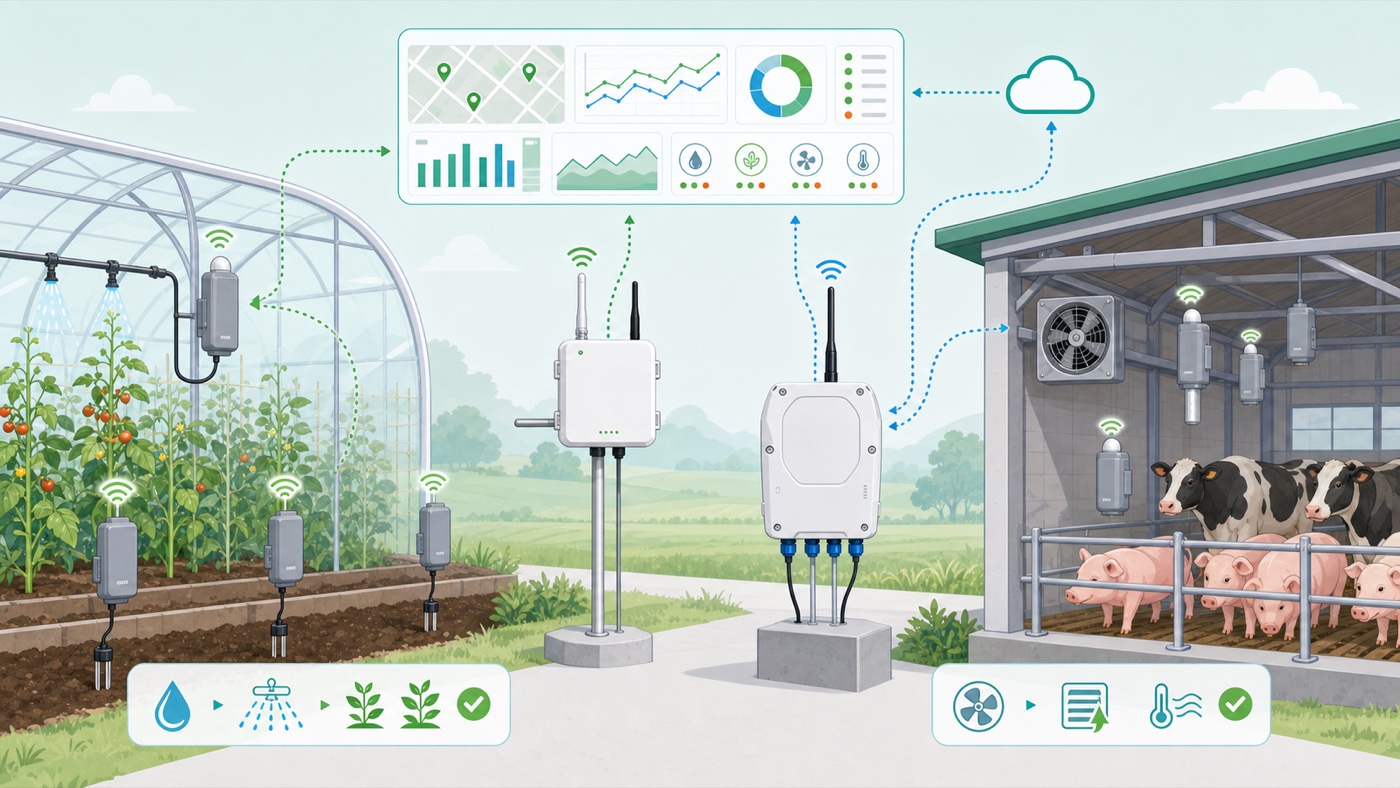
Battery-powered LoRaWAN sensors are not tied to cable runs or power outlets
The four steps below assume the sensors report wirelessly. Compared with running RS485 bus or Ethernet back to a control room, wireless sensing differs in three ways.
Sensing points are not constrained by cabling. Fields, rivers, towers and street poles are often hundreds of metres or more from the control room, and cabling cost grows with distance. LoRaWAN sensors need no cable to the gateway; 4G data loggers use the cellular network.
Points without mains power can run long term. The S210x series and the S2100 data logger carry a lithium thionyl chloride battery with a nominal life of up to 10 years; higher-power devices can pair with a solar panel. Actual life depends on reporting interval, distance and ambient temperature.
Data can go to your own platform. Readings can be forwarded to your own system through the SenseCAP platform's API / MQTT; on the LoRaWAN path the network server can also run on a local server, so data never crosses the public internet.
System anatomy and three monitoring targets
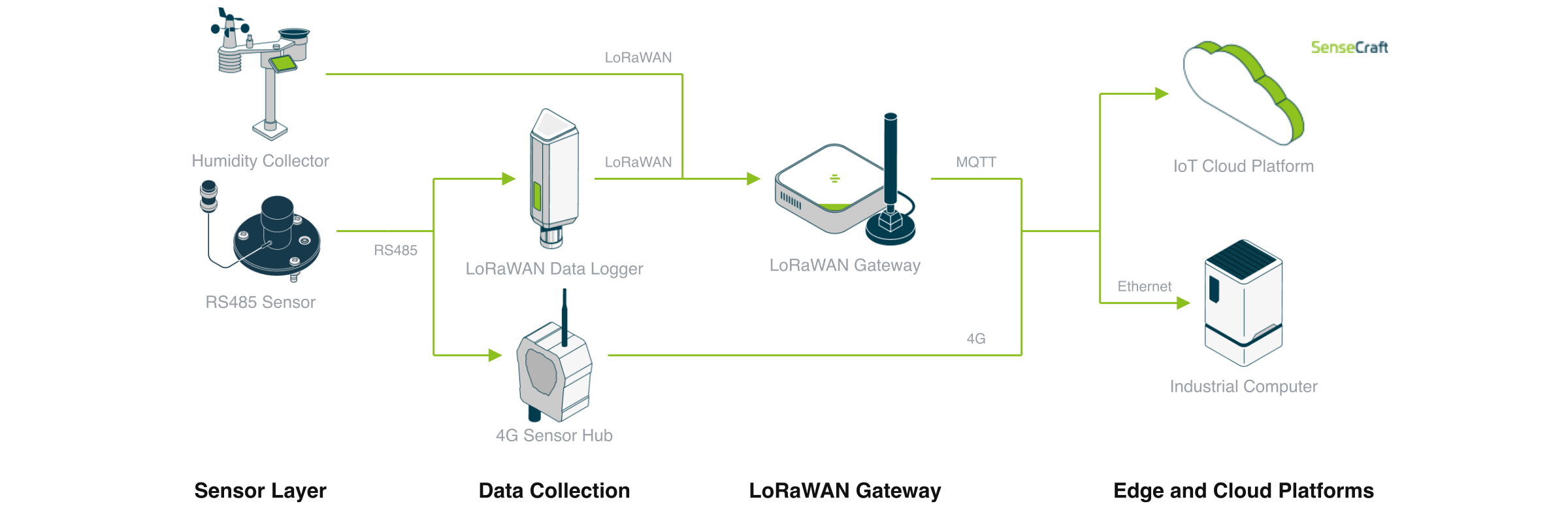
Three backhaul paths: native LoRaWAN, RS485 to LoRaWAN, RS485 to 4G
A wireless environmental monitoring system has four roles:
- Sensors — measure physical quantities. Either native LoRaWAN sensors (own radio and battery) or RS485 / analogue industrial probes (need a data logger to go wireless)
- Data loggers — convert RS485 or analogue signals to wireless. The S2100 converts to LoRaWAN; the Sensor Hub 4G converts to cellular
- Gateways — receive LoRaWAN traffic and connect it to the internet or a local network. The 4G path needs no gateway
- Platform — the SenseCAP cloud, a self-hosted LoRaWAN network server, or your own system via API / MQTT
By monitoring target, requirements fall into three groups.
Outdoor weather: landing sites, transmission towers, city streets
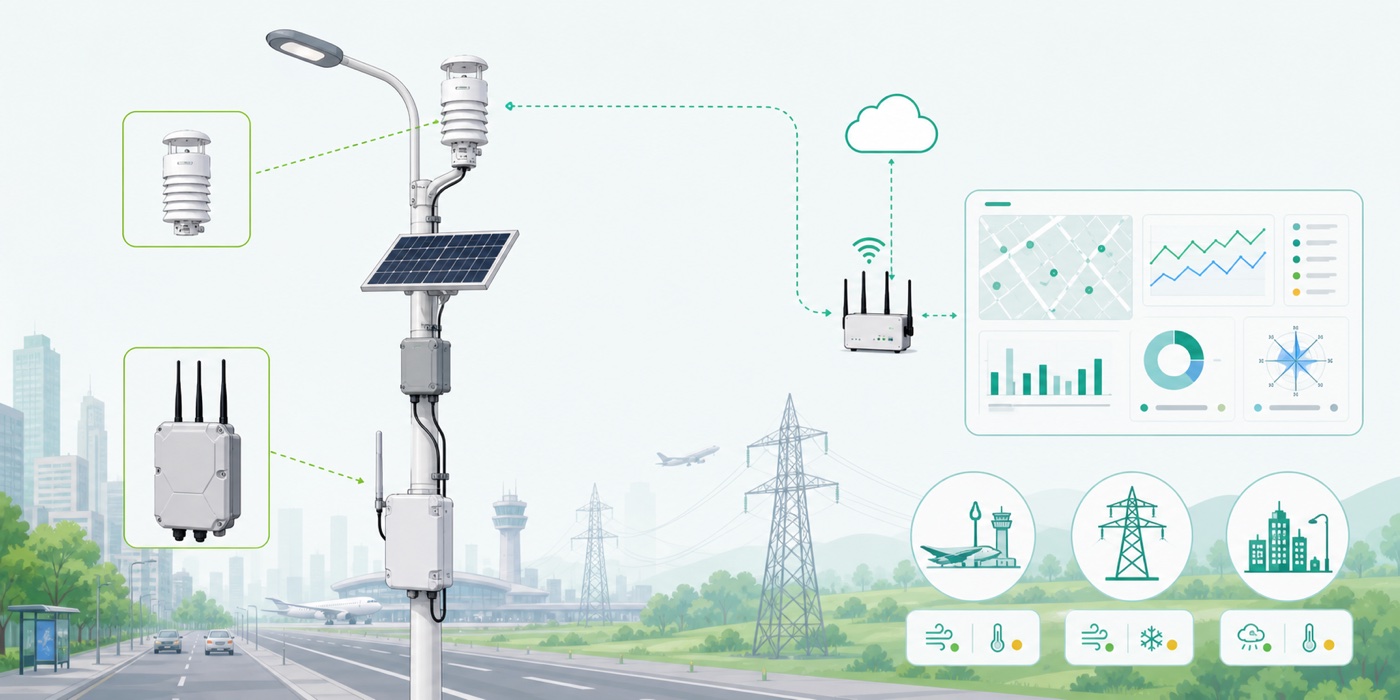
A weather station combines wind speed and direction, temperature and humidity, pressure, rainfall and light in one pole-mounted unit. There are two kinds by backhaul: the S2120 is a native LoRaWAN battery device; the S500 to S1000 series output RS485 / SDI-12 only, need external DC power, and report through an S2100 or a Sensor Hub 4G.
Air and soil: livestock ventilation, building fresh air, greenhouse irrigation
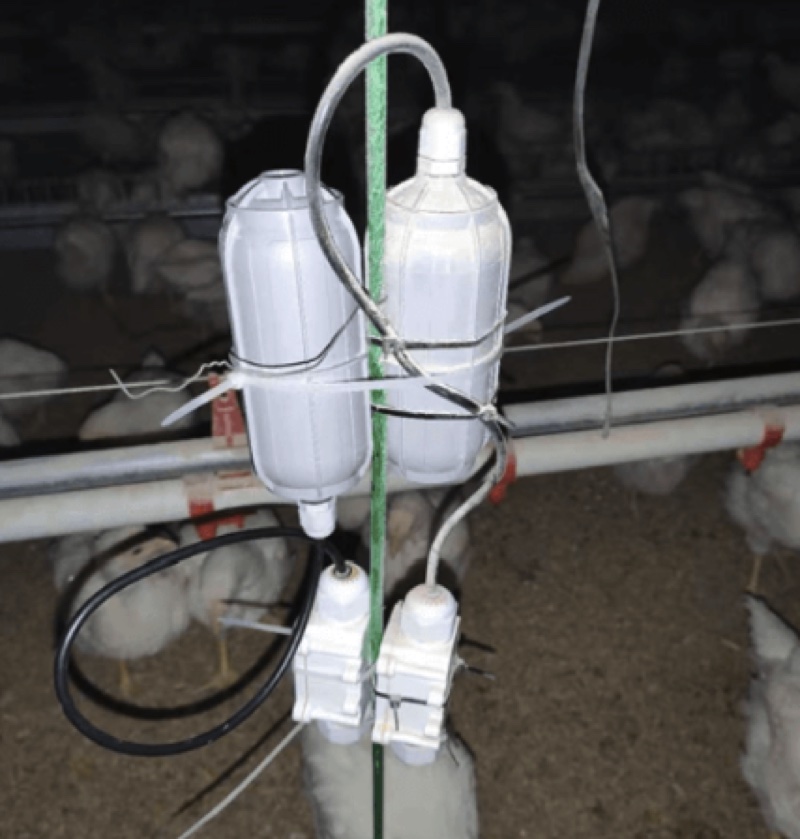
CO₂, temperature, humidity and ammonia readings drive ventilation control; soil moisture, electrical conductivity (EC) and pH readings inform irrigation and fertigation. The S210x series covers most air and soil parameters on battery, and clustered points share one gateway.
Water quality: aquaculture, river sections, wastewater treatment
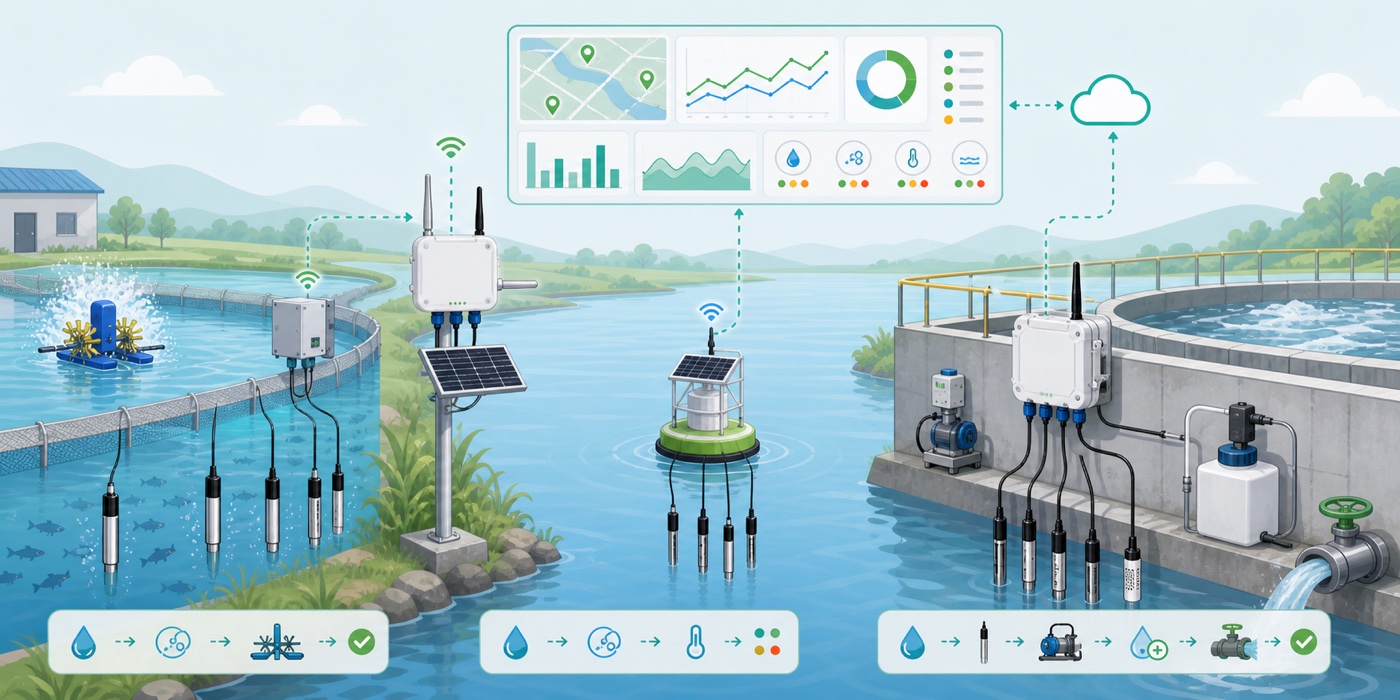
Dissolved oxygen, turbidity, pH, EC/TDS and liquid level are measured with RS485 industrial probes and sent back through an S2100 or a Sensor Hub 4G. Supply voltage varies widely across water-quality probes and is the first specification to check for these points (see Step 3).
Step 1: Fix the parameters and ranges
Selection starts from the parameter list. Find the model for each parameter first, then check its interface — the interface decides the backhaul path in Step 2.
Weather stations, by number of measurements:
| Model | Measurements | Output | Protection | |
|---|---|---|---|---|
 | S200 Wind Speed and Direction | Wind speed 0–60 m/s (standard), direction 0–360° | RS485 / SDI-12 | IP66 |
 | S500 5-in-1 | Temperature, humidity, pressure, wind speed, wind direction | RS485 / SDI-12 | IP66 |
| S700 V2 7-in-1 | S500 set + rainfall, light | RS485 / SDI-12 | IP66 |
 | S700-B 7-in-1 (Solar Radiation) | Temperature, humidity, pressure, wind, optical precipitation intensity, global solar radiation, sunshine duration | RS485 / SDI-12 | IP66 |
| S2120 8-in-1 | Temperature -40–80 °C, humidity, wind speed 0–50 m/s, wind direction, rainfall 0–450 mm/h, light, UV index, pressure | LoRaWAN | — |
 | S800 8-in-1 | S500 set + PM2.5, PM10, noise | RS485 / SDI-12 | IP65 |
 | S1000 V2 10-in-1 | Temperature, humidity, pressure, light, rainfall, wind, PM2.5, PM10, CO₂ | RS485 / SDI-12 | IP66 |
The S700 is also available with radar rainfall (S700-A) and with solar radiation plus radar rainfall (S700-C). The S2120 protection rating is not listed on its specification page; confirm it with sales before ordering.
Air, soil and water-quality parameters:
| Model | Range (nominal) | Interface | Protection | |
|---|---|---|---|---|
 | S2101 Air Temperature & Humidity | Temperature -40–85 °C; humidity 0–100 %RH | LoRaWAN | IP66 |
| S2103 CO₂, Temperature & Humidity | CO₂ 400–10000 ppm | LoRaWAN | IP66 |
| SenseCAP Combo 5-in-1 with 4G | Temperature, humidity, pressure, light, CO₂ (ranges not listed on the specification page); up to 10 external probes on RS485 | 4G | IPX5 |
 | S2105 Soil Moisture, Temperature & EC | Moisture 0–100 %; EC 0–23 dS/m | LoRaWAN | IP66 |
 | S2108 Soil Moisture, Temperature & Pore EC | Pore EC 0–32 mS/cm | LoRaWAN | IP66 |
 | S2106 pH | pH 0–14 | LoRaWAN | IP66 |
 | S-Soil MTEC-02 soil probe | Moisture 0–100 %; EC 0–10000 μS/cm | RS485 | IP68 |
 | Dissolved oxygen probe | 0–20 mg/L | RS485 | IP68 |
 | Turbidity probe | 0–1000 NTU | RS485 | IP68 |
 | pH probe S-pH-01 | pH 0–14 | RS485 | IP65 |
 | EC & TDS probe | EC 0–20000 μS/cm | RS485 | IP66–IP68 |
 | Liquid level probe | 0–5 m | RS485 | IP68 |
 | NH₃ probe | 0–100 ppm | RS485 | IP65 |
Four rules:
- Every item on the parameter list is a LoRaWAN model: no data logger is needed, only a gateway
- Any RS485 device appears (S500–S1000 weather stations, water-quality probes, S-Soil soil probe): give it a data logger and check its supply in Step 3
- Several RS485 probes at one point: the S2100 supports one protocol channel at a time; choose the Sensor Hub 4G (4 RS485 channels)
- A greenhouse or shed needs only temperature, humidity, pressure, light and CO₂, and has cellular coverage: choose the SenseCAP Combo, all-in-one 4G with no data logger or gateway; add soil probes on its RS485 port
Scope. Ranges in the tables are rated values for checking whether a model covers the parameters you need; accuracy, response time and maintenance requirements are on each model's product page.
Step 2: Choose the backhaul
Backhaul is decided by how the points are distributed and what networks are available. The first question is whether the points sit within one gateway's coverage.
| Point distribution | Backhaul path | Devices needed | Key constraint |
|---|---|---|---|
| Clustered (one farm, campus or building) | Native LoRaWAN | S210x / S2120 + gateway | Gateway coverage must be tested on site |
| Clustered, with RS485 probes | RS485 to LoRaWAN | Probes + S2100 + gateway | One S2100 per probe group |
| Scattered (along a river or road, across districts), cellular coverage | RS485 to 4G | Probes + Sensor Hub 4G | Depends on cellular signal and the cloud |
| Scattered greenhouses or sheds, only the five air readings (temperature, humidity, pressure, light, CO₂), cellular coverage | All-in-one 4G | SenseCAP Combo | Needs an active SIM card; no wind or rain, does not replace an outdoor weather station |
| Data must stay on site | LoRaWAN + local network server | As above, network server on site | You operate the network server |
The two data loggers compared:
| Data logger | Inputs | Backhaul | Power | Protection / temperature | Reference price | |
|---|---|---|---|---|---|---|
| S2100 | 1× RS485, 2× analogue (0–10 V or 4–20 mA), 1× GPIO | LoRaWAN, needs gateway | 19 Ah battery / external 12 V | IP66 / -40–85 °C | ~$73 |
| Sensor Hub 4G | 4× RS485 | Cellular, no gateway | DC adapter | IP66 / -40–70 °C | ~$219 |
LoRaWAN gateways, by installation location:
| Gateway | Location | Backhaul and power | Protection / temperature | Reference price | |
|---|---|---|---|---|---|
 | SenseCAP M2 Indoor Gateway | Indoor desktop | Ethernet / Wi-Fi; 12 V adapter | Indoor | ~$99 |
 | SenseCAP Outdoor Gateway | Outdoor | Ethernet; PoE, 3.6 W nominal | IP66 | ~$399 |
 | reComputer R1225 | Control cabinet, DIN rail / wall | Ethernet; RS485 and edge control | IP40 / -30–70 °C | from ~$349 |
Prices are reference prices at the time of lookup, for order of magnitude only; the product page is authoritative when ordering.
Four rules:
- Points sit within one gateway's coverage: choose LoRaWAN. S210x and S2120 report directly; RS485 probes connect through an S2100
- Points are scattered, a gateway is impractical, and there is cellular coverage: choose the Sensor Hub 4G. The S500–S1000 weather stations have no 4G of their own; cellular backhaul requires a Sensor Hub 4G
- Data must stay on site: choose LoRaWAN and run the network server on the ChirpStack built into the M2 gateway or on your own server
- Gateway location: indoors, the M2; on an outdoor pole, the outdoor gateway; inside a control cabinet with RS485 devices wired directly, the reComputer R1225
Scope. The S210x and S2100 list a nominal range of 2 km urban and 10 km line of sight; the S2120 lists 2–10 km line of sight, typically 1–3 km in real installations. Buildings, terrain and gateway height all change the result, so test the signal on site before fixing gateway positions. For points out of coverage, add a gateway or switch that point to 4G.
Step 3: Decide the power supply
There are three options: battery, solar and DC mains. The deciding factor is the nominal input voltage of the device and its probes, not whether the site has power.
| Device | Nominal supply | Can run on battery alone |
|---|---|---|
| S210x series sensors | Built-in lithium thionyl chloride battery, replaceable | Yes |
| S2120 weather sensor | 3 AA internal or 6 AA external batteries, with a solar panel | Yes |
| S2100 data logger | 19 Ah built-in battery; external 12 V with battery as backup | Yes (with 3 V / 5 V probes) |
| S500 / S700 / S800 / S1000, S200 | DC 12–24 V; heating needs a separate 24 V supply (24 V @ 1 A recommended) | No |
| Sensor Hub 4G | DC adapter | No (DC only) |
| SenseCAP Combo | Solar panel, power adapter included; built-in backup battery rated for about two weeks during outages | No (battery is an outage backup) |
| Dissolved oxygen probe | 12 V, 0.3 W nominal | No, external 12 V |
| Turbidity probe | 12–24 V | No, external 12 V |
| Liquid level probe | 11–30 V | No, external 12 V |
| pH, EC & TDS probes | 3.9–30 V | Yes (from S2100 5 V output) |
| S-Soil MTEC-02 soil probe | 3.6–30 V | Yes (from S2100 5 V output) |
| NH₃, H₂S probes | 5 V | Yes (from S2100 5 V output) |
Three rules:
- Battery points: use native LoRaWAN sensors only, or probes powered at 3 V / 5 V through an S2100. The S2100 periodic power mode switches the probe on only before each reading to reduce consumption
- Probes that need 12 V (dissolved oxygen, turbidity, liquid level): the S2100 battery cannot drive them; an external 12 V supply is required, so plan these as powered points. Aquaculture and wastewater points usually fall into this group
- DC devices without mains: RS485 weather stations and the Sensor Hub 4G pair with the PV-12W waterproof solar panel (mounting bracket included)
Battery life. The S210x series and the S2100 list a nominal battery life of up to 10 years. This is the datasheet maximum; the actual figure depends on reporting interval, distance and ambient temperature, and with RS485 probes also on probe consumption. The S2120 specification gives no figure in years; its battery life depends on frequency band, distance to the gateway and ambient temperature. For project planning, estimate with the battery life calculator using the actual reporting interval.
Step 4: Match the installation environment
The site decides protection rating and mounting. The first question is whether the device is submerged; the second is whether it is exposed outdoors.
- Submerged in water or buried in soil (ponds, rivers, wastewater tanks, fields) → IP68 probes: dissolved oxygen, turbidity, liquid level, S-Soil MTEC-02
- Exposed outdoors, not submerged (poles, towers, rooftops) → IP65 / IP66 devices: weather stations, S210x, S2100, Sensor Hub 4G, outdoor gateway
- Hung inside a greenhouse or shed → SenseCAP Combo (IPX5, UV-resistant housing)
- Indoors or inside a control cabinet → M2 gateway (desktop), reComputer R1225 (IP40, DIN rail)
| Device | Protection | Operating temperature (nominal) | Mounting | |
|---|---|---|---|---|
| S2101 / S2103 | IP66 | -40–85 °C | Outdoor |
| S2105 / S2108 | IP66 | -40–80 °C | Probe inserted in soil |
| S500 / S700 / S1000 | IP66 | -40–85 °C | Pole mount |
| S800 | IP65 | -40–85 °C | Pole mount |
| S2100 data logger | IP66 | -40–85 °C | Outdoor |
| Sensor Hub 4G | IP66 | -40–70 °C | Outdoor |
| SenseCAP Combo | IPX5 | Not listed on the specification page | Hung from greenhouse structure |
| reComputer R1225 | IP40 | -30–70 °C | DIN rail / wall, in cabinet |
When installing the S2120, align the pole base to true north (compass or GPS); otherwise wind direction carries a fixed offset. Operating temperatures for the S2106 and the water-quality probes are not listed on their specification pages; check the product pages.
For solution providers and system integrators: from proof to delivery
If this setup is delivered to downstream customers, confirm the following three items at selection time.
Proof path. The agricultural environment monitoring reference design shows three ways to bring SenseCAP S210x nodes and the S2100 data logger into Home Assistant: through the SenseCAP cloud, through the local ChirpStack built into the M2 gateway, or through The Things Stack self-hosted on a reComputer R12 Series gateway. That design provides the integration configuration and data format; it gives no figures for range, nodes per gateway, packet loss or battery life. Estimate those from datasheets and confirm them on your own site.
Data integration. Readings reach your own platform through the SenseCAP API / MQTT; where data must stay on site, run a LoRaWAN network server locally. A self-hosted network server needs each node's join keys entered and the SenseCAP decoder installed; without them data cannot be decoded into measurements.
Hardware customisation and volume supply. The Seeed devices in this setup support custom logo, enclosure, packaging and pre-installed firmware, and interface configurations can be adjusted on existing models. Scope, certification coverage and lead times are on the ODM/OEM customisation service page.
Measurement basis and comparison scope
All figures are nominal values from product datasheets and official wiki pages, not field measurements. Range depends on obstructions, terrain and gateway height; battery life depends on reporting interval, temperature and probe consumption. Before delivery, test the signal on the target site and estimate battery life from the actual reporting interval.
Device data is drawn from the Seeed product line, covering native LoRaWAN sensors, RS485 industrial probes, LoRaWAN and 4G data loggers, and gateways. A single product line is used because battery-life and range figures across vendors are rarely measured under the same conditions. The method here (parameters first, then backhaul, then supply voltage, then protection rating) is brand-independent and applies equally to other vendors' devices.
Data sources and test conditions
- Measurements and ranges: Seeed product database specifications for each model
- Weather station interfaces and heating supply: wiki "Getting Started with SenseCAP ONE Compact Weather Sensor"
- S2120 power, range and mounting: wiki "Getting Started with SenseCAP S2120 8-in-1 LoRaWAN Weather Sensor"
- S2100 battery, life, inputs and 12 V supply: wiki "SenseCAP Data Logger" and "How to Configure the 12V RS485 Sensor for S2100 Data Logger"
- S210x battery, life, protection and range: wiki "SenseCAP LoRaWAN S210X Series Sensor"
- Sensor Hub 4G interfaces, protection, temperature and power versions: wiki "SenseCAP Sensor Hub Data Logger"
- SenseCAP Combo measurements, 4G backhaul, RS485 expansion, power and protection: Seeed product database description and the September 2026 new product post
- Gateways, probe supply voltages, protection ratings and operating temperatures: Seeed product database specifications for each model
- Reference prices: product page prices recorded in the product database; subject to change, the product page is authoritative


